How-to

How to Create a WhatsApp Business Account: App Setup, Profile and the API Route

Riya · ReputooUpdated 25 October 202610 min read
How to create a WhatsApp Business account
App or API — pick the one that fits today.
On this page · 14 chapters
  1. 01 · App Account or API Account: Which Do You Need?
  2. 02 · How to Create a WhatsApp Business Account in the App
  3. 03 · Set Up a Business Profile Customers Trust
  4. 04 · Add a Catalogue
  5. 05 · Use WhatsApp Business on More Than One Device
  6. 06 · Moving from Personal WhatsApp to WhatsApp Business
  7. 07 · How a WhatsApp Business API Account Is Created
  8. 08 · What a WhatsApp Business Account Costs
  9. 09 · Getting the Verified Badge
  10. 10 · Common Problems and Fixes
  11. 11 · Your First Week Checklist
  12. 12 · When to Move from the App to the API
  13. 13 · FAQs
  14. 14 · Final Thoughts

"WhatsApp Business account" means two different things, and it is worth knowing which one you need before you start. For most small businesses it means the free <strong>WhatsApp Business app</strong> — a separate app with a business profile, catalogue, labels and automatic greetings. For businesses that want campaigns, a team inbox or automation, it means a <strong>WhatsApp Business Account (WABA)</strong> on the WhatsApp Business Platform — the official API.

This guide walks through creating a WhatsApp Business account in the app step by step, setting up a profile customers trust, moving your existing personal WhatsApp to business without losing chats, and then how a WhatsApp Business API account is created when the app is no longer enough.

Chapter 01

App Account or API Account: Which Do You Need?

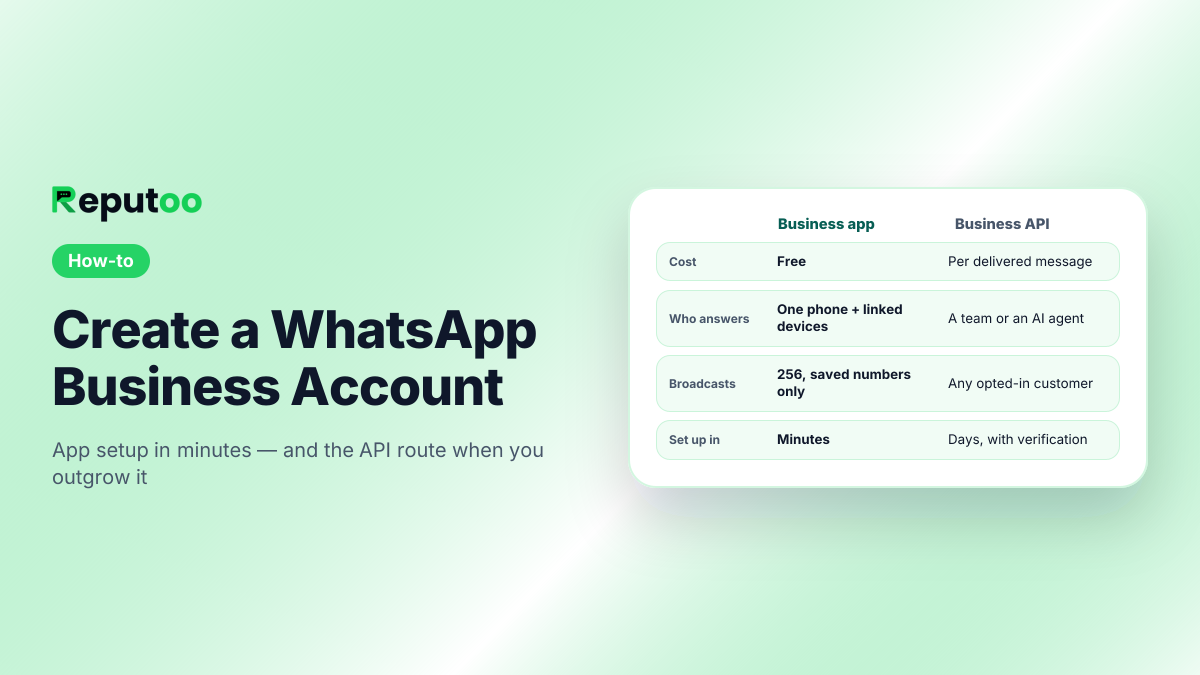
WhatsApp Business appWhatsApp Business API (WABA)
CostFreePer delivered message (Meta), plus a platform if you use one
Who answersOne phone plus a few linked devicesA whole team, a chatbot or an AI agent
BroadcastsLists of up to 256 who saved your numberCampaigns to any opted-in customer
AutomationGreeting and away messages, quick repliesChatbots, triggers from your shop or CRM
Set up inMinutesUsually days, including Meta verification

Start with the app if one person can handle your chats. Move to the API when you need several people on one number, campaigns to a big list, or automation. The full comparison is in WhatsApp vs WhatsApp Business.
Chapter 02

How to Create a WhatsApp Business Account in the App

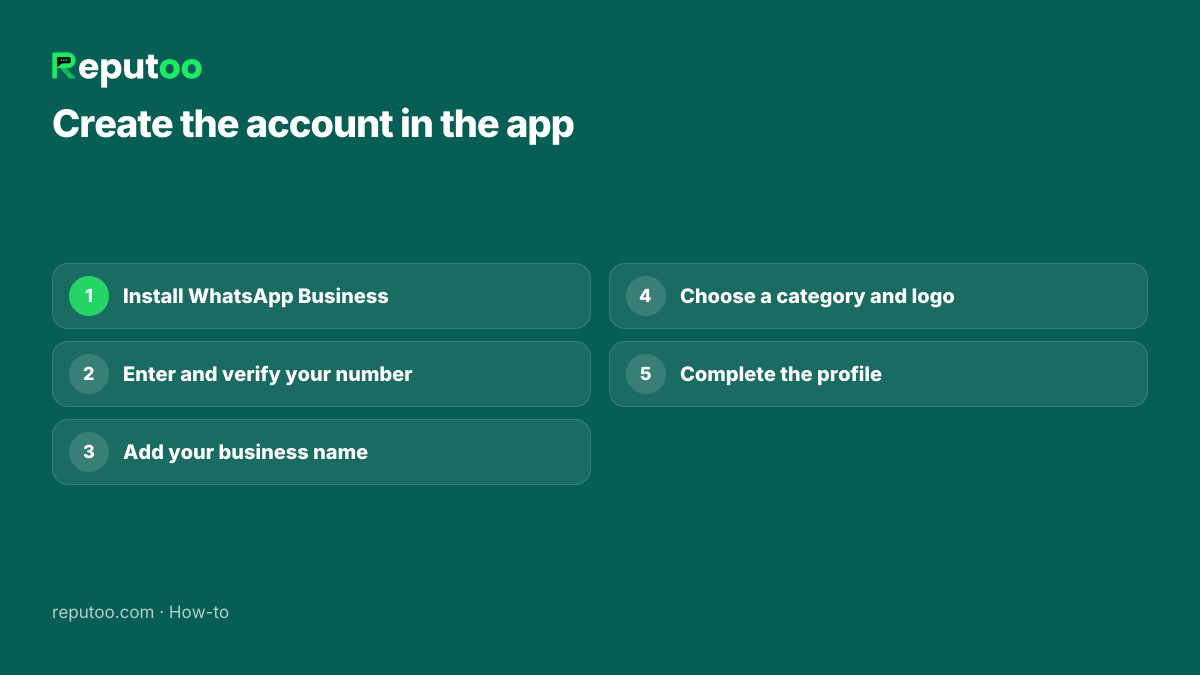
  1. Install WhatsApp Business from the Google Play Store or Apple App Store. It is a separate app from WhatsApp Messenger, with a "Business" icon.
  2. Agree to the terms and enter the phone number you want customers to use. It can be a mobile or landline number that can receive an SMS or call.
  3. Verify the number with the six-digit code WhatsApp sends.
  4. Enter your business name exactly as customers know you — it is what they see at the top of the chat.
  5. Choose a business category (restaurant, clinic, retail and so on) and add a profile photo — usually your logo.
  6. Complete the profile (next section) and you are ready to chat.

The number you register cannot be used on personal WhatsApp at the same time. If it is already your personal WhatsApp number, read the section on moving from personal WhatsApp first.

Steps to create a WhatsApp Business account in the app
Five steps in the WhatsApp Business app.
Chapter 03

Set Up a Business Profile Customers Trust

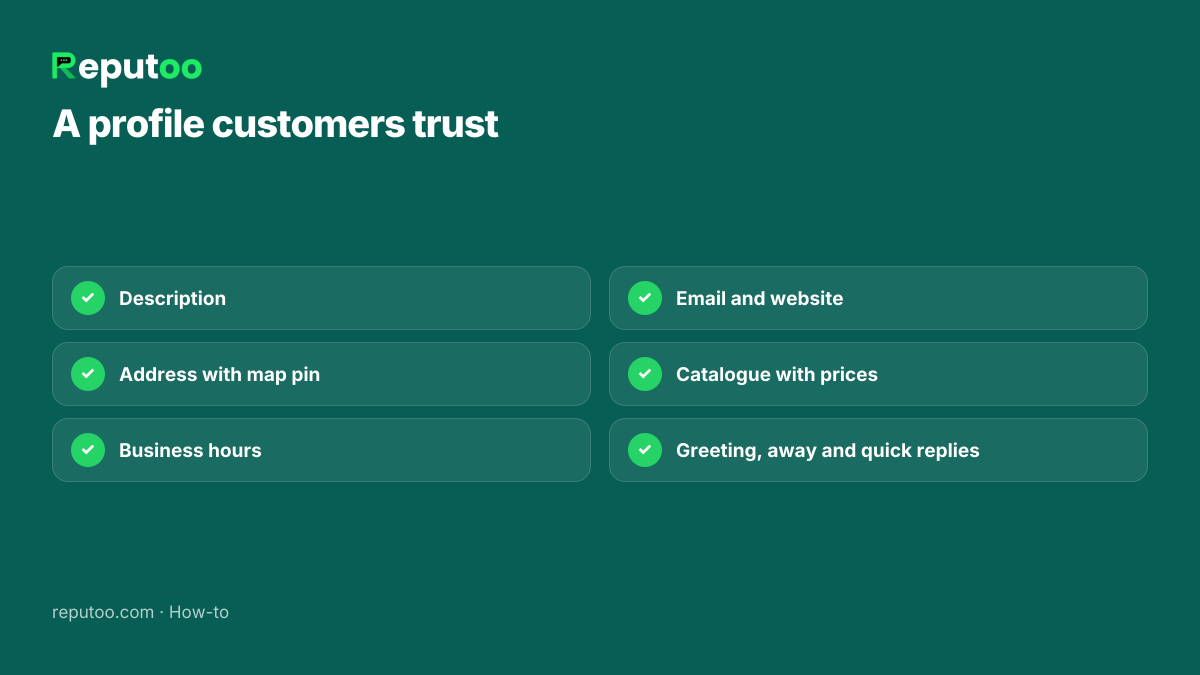
The profile is what a customer checks before they trust a message or a payment link from you. Fill in every field:

  • Description — one or two lines on what you do and for whom. Ideas in WhatsApp business description examples.
  • Address — with a map pin, if customers visit you.
  • Business hours — so customers know when to expect a reply.
  • Email and website — another way to check you are real.
  • Catalogue — products or services with prices, so customers can browse before asking.

Then set up the three tools that save the most time: a greeting message for first-time chats, an away message for closed hours, and quick replies for the questions you answer every day. Starting points: greeting messages and auto-reply messages.

WhatsApp Business profile fields to complete
What customers check before they trust a message.
Chapter 04

Add a Catalogue

A catalogue lets customers browse what you sell without asking for a price list every time. In the WhatsApp Business app, open the business tools, choose Catalogue, and add items one by one: a photo, a name, a price and a short description. Group items into collections — "Haircuts", "Colour", "Packages" — so customers can find them quickly.

Keep it current: a catalogue with old prices does more harm than none. Share a single item in a chat when a customer asks about it, or share the whole catalogue link in your profile and on social media.

Chapter 05

Use WhatsApp Business on More Than One Device

The Business app lets you link a few extra devices — a computer through WhatsApp Web or the desktop app, or another phone — to the same account. That helps a small team share the load: one person at the counter, another at a laptop. Open Linked devices in settings, choose Link a device and scan the QR code on the other device; see how to scan the WhatsApp Web QR code.

Linked devices share one inbox but there is no assignment, so two people can answer the same customer or both miss them. When that starts happening, a shared team inbox on the API is the fix — see WhatsApp team inbox.

Chapter 06

Moving from Personal WhatsApp to WhatsApp Business

If customers already message your personal WhatsApp number, you can switch it to the Business app and keep your chats:

  1. Back up your chats in personal WhatsApp first (Settings → Chats → Chat backup).
  2. Install WhatsApp Business on the same phone and enter the same number.
  3. Accept the offer to move your account and chat history when the app detects your existing WhatsApp.
  4. Set up the business profile as above.

Your personal WhatsApp then stops working on that number. Many owners keep their personal number personal and use a second number — a second SIM, a dual-SIM phone or a landline — for the business. That also makes a later move to the API easier, because the business number is not tied up with family chats.

Chapter 07

How a WhatsApp Business API Account Is Created

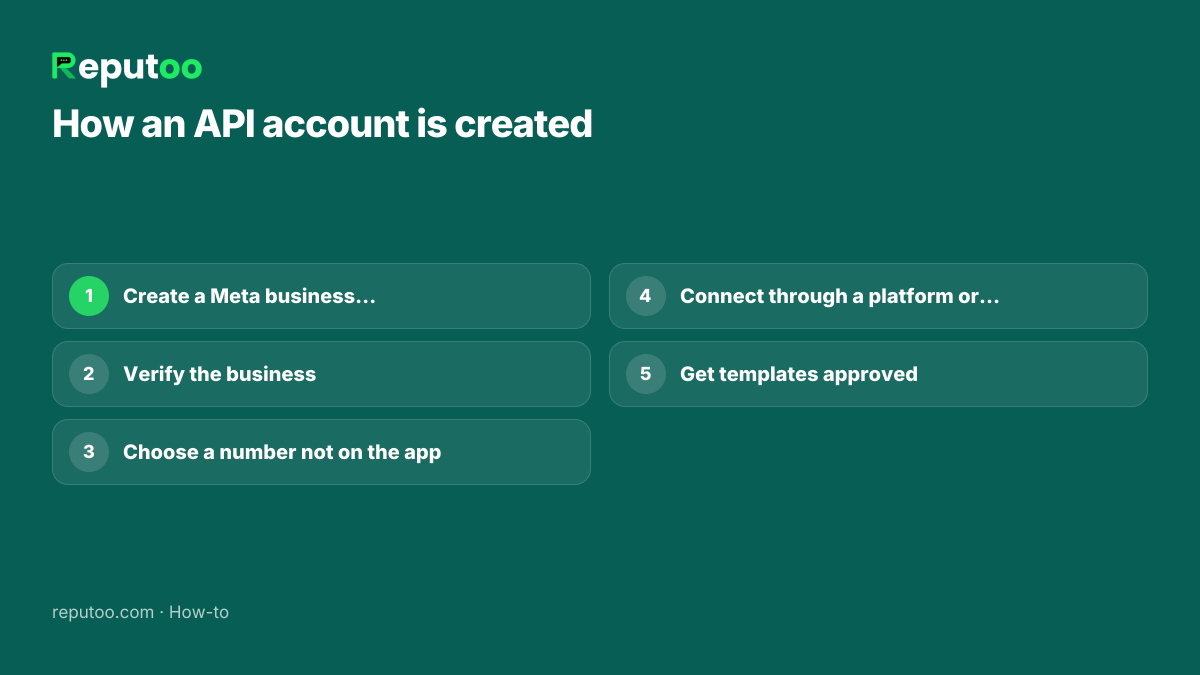
An API account is not created in an app. It is a WhatsApp Business Account (WABA) inside your Meta business portfolio, with one or more phone numbers registered to it. The steps:

  1. Create a Meta business portfolio at business.facebook.com with your legal business name and website.
  2. Verify the business with Meta — in India usually with a GST certificate, certificate of incorporation or Udyam registration.
  3. Choose a number that is not active on the WhatsApp or WhatsApp Business app.
  4. Connect through a platform or directly — a platform such as Reputoo uses Meta's own sign-up, which creates the WABA inside your portfolio and registers the number.
  5. Get your first message templates approved and start messaging customers who opted in.

Details, with each screen, are in how to get the WhatsApp Business API, and what a WABA is in what is a WABA.

How a WhatsApp Business API account is created
The WABA lives in your Meta business portfolio.
Chapter 08

What a WhatsApp Business Account Costs

The WhatsApp Business app is free — no subscription and no charge per message.

On the WhatsApp Business API, creating the account and registering numbers is free; Meta charges per delivered message. For Indian numbers on the October 1, 2026 rate card, before GST, a marketing message costs ₹0.8631 and a utility or authentication message ₹0.115. Since 1 October 2026, replies inside the 24-hour window are charged at the utility rate too. A platform adds its own subscription — Reputoo plans start at ₹999 a month with no markup on Meta's rates. Estimate your bill with the WhatsApp API cost calculator.

Chapter 09

Getting the Verified Badge

Creating an account does not give you a verified badge. On the API, verifying your business with Meta raises your messaging limit and shows your display name; the separate verified badge (the "green tick") is granted by Meta to notable brands, and applying does not guarantee it. What it takes and how to apply: WhatsApp verified badge (green tick).

For most small businesses, a complete profile, a recognisable name and logo, and consistent, useful messages build more trust than a badge.

Chapter 10

Common Problems and Fixes

  • "This number is already registered." The number is active on another WhatsApp app. Move or delete that account first.
  • Verification code not arriving. Wait for the timer, then choose the voice call option; check the number has signal and is entered with the right country code.
  • Landline number. Choose "Call me" during verification, since a landline cannot receive the SMS.
  • Business name rejected on the API. The display name must match your business; generic names and names with extra keywords get rejected.
  • Account banned. Usually caused by bulk messaging people who did not opt in, or using unofficial "bulk sender" tools. See how to unblock a WhatsApp account.
Chapter 11

Your First Week Checklist

  1. Profile complete: logo, description, address, hours, website.
  2. Greeting message, away message and five quick replies saved.
  3. Catalogue with your top ten products or services and current prices.
  4. Labels for the stages you care about: new enquiry, quoted, paid, follow up.
  5. Your WhatsApp number on your bills, shop sign, website and social profiles — with "Save us on WhatsApp".
  6. A wa.me link or website chat button so customers can start a chat in one tap.
  7. A rule for the team: every new chat answered the same day.
Chapter 12

When to Move from the App to the API

The app is enough until one of these happens:

  • More than one or two people need to answer customers from the same number.
  • You want to send offers or updates to hundreds or thousands of customers, not just those who saved your number — see WhatsApp bulk message sender.
  • Customers message at night and you want an AI agent to answer and book.
  • You want messages triggered automatically by orders, bookings or payments.

Then it is time for the WhatsApp Business API. You can keep the same number — it just moves from the app to the API.

Chapter 13

FAQs

Is a WhatsApp Business account free?

The WhatsApp Business app is free. On the WhatsApp Business API, creating the account is free but Meta charges per delivered message — in India ₹0.8631 per marketing and ₹0.115 per utility message on the October 1, 2026 rate card.

Can I use the same number for WhatsApp and WhatsApp Business?

Not at the same time. A number can be active on only one WhatsApp app. You can move your personal number to WhatsApp Business and keep your chats, or use a second number.

Can I create a WhatsApp Business account without a SIM card?

Yes, with a landline or other number that can receive a verification call. Choose the call option instead of SMS when verifying.

Do I need a GST number for a WhatsApp Business account?

Not for the free app. For the WhatsApp Business API, Meta asks you to verify your business; in India a GST certificate is one of the commonly accepted documents.

How long does it take to create a WhatsApp Business account?

A few minutes in the app. An API account usually takes a few days because of Meta business verification, though you can start with limits before it completes.

Can I move my WhatsApp Business app number to the API later?

Yes. Delete the app account on that number (after backing up what you need), then register it on the API through Meta or a platform. App chat history does not move to the API.

What name should I use for my WhatsApp Business account?

The name customers know you by — the one on your shop sign, website and bills. On the WhatsApp Business API, Meta reviews the display name and rejects generic names or names stuffed with keywords, so keep it to your real business name.

Can I have two WhatsApp Business accounts on one phone?

You can run WhatsApp Business and personal WhatsApp side by side on a dual-SIM phone, each with its own number. For a second business number, use another phone or move that number to the WhatsApp Business API.

Can customers tell that I am using WhatsApp Business?

Yes. Business accounts show a business profile with your category, description and hours, which customers can open from the chat. That is a good thing: it tells them they are talking to a real business.

Chapter 14

Final Thoughts

Creating a WhatsApp Business account in the app takes minutes, and a complete profile with greeting and away messages makes a small business look and feel professional from the first chat.

When your chats outgrow one phone, the same number can move to the WhatsApp Business API — and that is where campaigns, a team inbox and AI agents come in.

Written by Riya · Reputoo. Riya writes Reputoo’s guides on WhatsApp for business, AI agents and voice AI for Indian businesses.

← Back to all articles
Put it to work

Ready for the API? Start with Reputoo

1,000+ businesses onboarded · Member of NVIDIA Inception · Official WhatsApp Business API, no per-message markup.

Get the details on WhatsAppNo payment needed. We will message you on WhatsApp.
+91
By sending, you agree to be contacted on WhatsApp. Prefer to write first? Message us