WhatsApp Marketing

WhatsApp Bulk Message Sender: How to Send to Thousands Without Getting Banned

Riya · ReputooUpdated 25 October 202610 min read
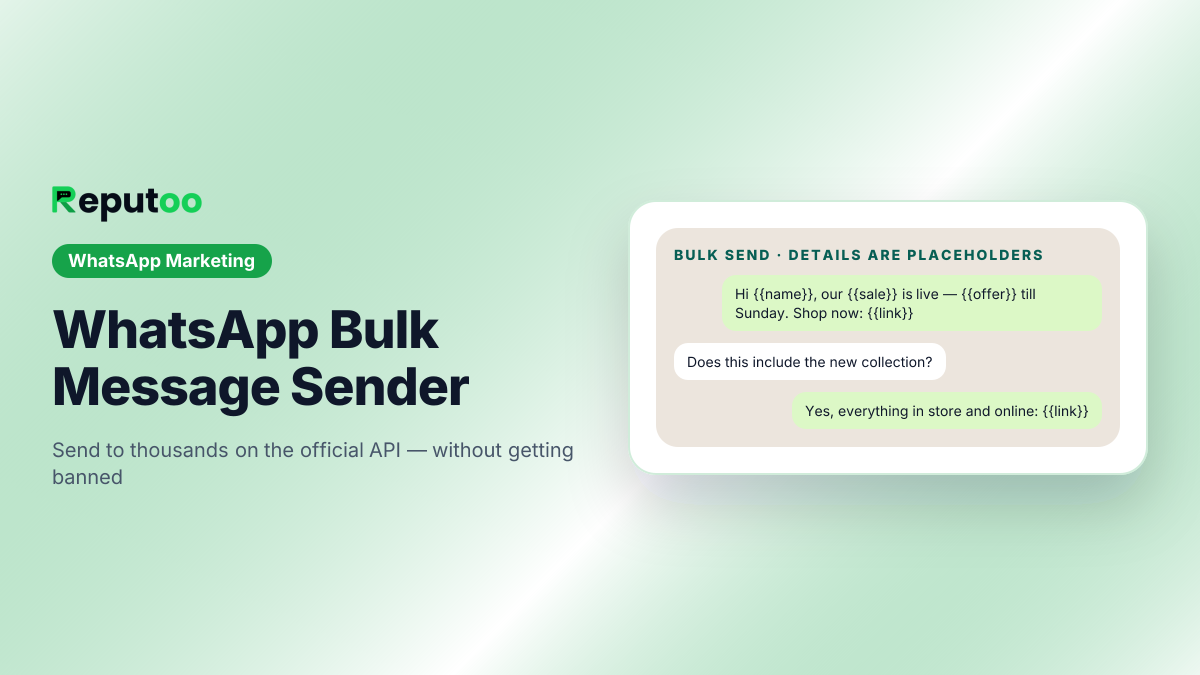
WhatsApp bulk message sender on the official API
One message, sent privately to each customer. Details are placeholders.
On this page · 10 chapters
  1. 01 · What a WhatsApp Bulk Message Sender Is
  2. 02 · Why Free Bulk Sender Tools Get Numbers Banned
  3. 03 · How an Official WhatsApp Bulk Sender Works
  4. 04 · Bulk Sender vs Broadcast List vs WhatsApp Group
  5. 05 · What Bulk WhatsApp Messages Cost
  6. 06 · How to Send Bulk WhatsApp Messages with Reputoo
  7. 07 · Writing Bulk Messages People Do Not Block
  8. 08 · Choosing a WhatsApp Bulk Sender: A Checklist
  9. 09 · FAQs
  10. 10 · Final Thoughts

Every business that sells on WhatsApp reaches the same point. The customer list has grown past what anyone can message by hand, a sale or a new collection is ready, and someone searches for a WhatsApp bulk message sender. The results are full of free tools that promise unlimited messages from your own number — and a week later, a lot of those numbers stop working.

There are two very different kinds of WhatsApp bulk sender. One kind automates the WhatsApp app or WhatsApp Web on your computer, pretending to be a person typing very fast. The other sends through the official WhatsApp Business Platform, the route Meta built for businesses to message customers at scale. The first is cheap until your number is banned. The second costs a small, predictable amount per message and is how every serious brand sends.

This guide explains the difference, what an official bulk sender lets you do, what it really costs, and how to send your first bulk campaign step by step — including how to write messages people read instead of block.

Chapter 01

What a WhatsApp Bulk Message Sender Is

A WhatsApp bulk message sender is any tool that sends one message to many people in a single action, instead of copying and pasting it into chat after chat. Businesses use it for offers, launches, festival greetings, appointment reminders, payment reminders and updates — anything the same group of customers needs to hear at the same time.

What matters is how the tool sends. Two designs dominate the market:

  • Automation senders. Desktop software or browser extensions that open WhatsApp Web with your number and type messages one by one. They are often sold as "WA sender", "bulk SMS on WhatsApp" or "free WhatsApp bulk sender".
  • Official API senders. Platforms that connect your number to the WhatsApp Business Platform (Meta's Cloud API) and send approved message templates to customers who opted in. Reputoo is one of these.

Both put a message in many chats. Only the second one is allowed by Meta, gives you delivery and read reports, and keeps working as your list grows.
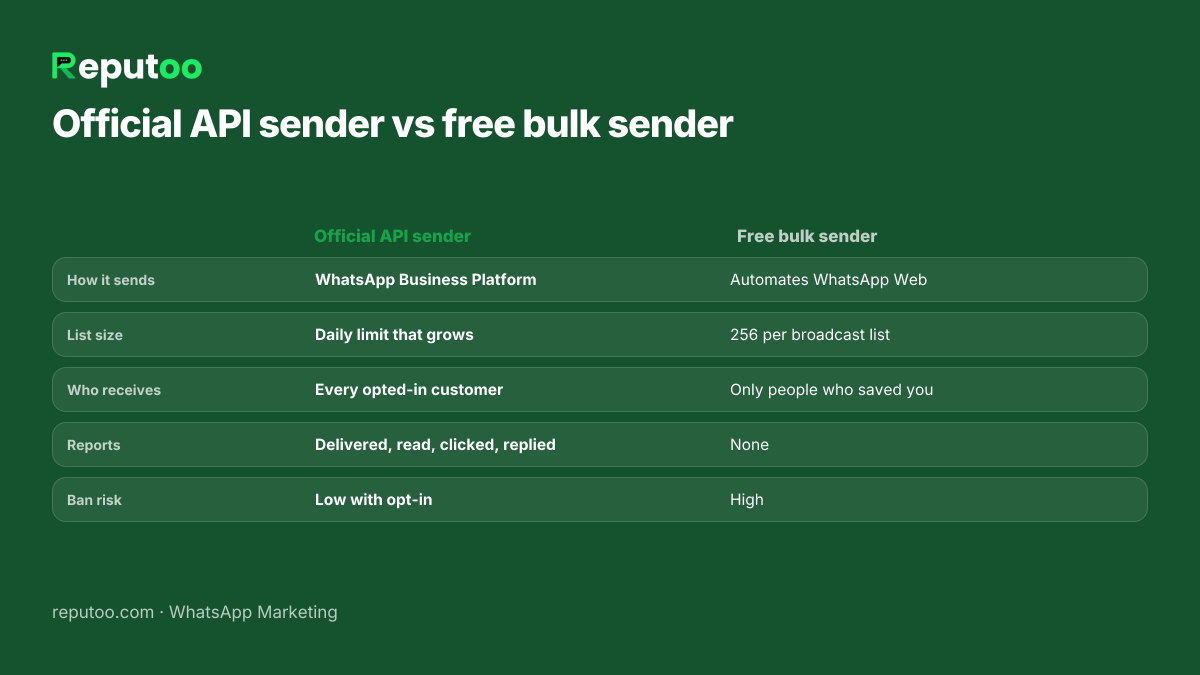
Free WhatsApp bulk sender tools compared with the official WhatsApp Business API
Why automation tools get numbers banned and the official route does not.
Chapter 02

Why Free Bulk Sender Tools Get Numbers Banned

WhatsApp's terms do not allow automated or bulk messaging from the personal app or the free WhatsApp Business app. Tools that drive WhatsApp Web are doing exactly that, and WhatsApp's systems are designed to spot it: many identical messages, sent quickly, to numbers that never wrote to you first. The usual result is a temporary block, then a permanent ban on the number — often the business's main number, printed on every bill and board.

Even when an automation sender is not caught, it runs into the app's built-in limits:

  • 256 contacts per broadcast list. The WhatsApp app caps each broadcast list at 256 recipients.
  • Only people who saved your number. A broadcast-list message reaches only contacts who have your number in their phone. On a typical customer list that can be a small fraction.
  • No reports. You cannot see who received, read or clicked, so you cannot tell a good campaign from a bad one.
  • Your computer has to stay on. Sending stops when the laptop sleeps or the browser session drops.

We cover the "free" option in more depth in free WhatsApp bulk senders: what works. The short version: the money saved is small, and the number at risk is your business.

Chapter 03

How an Official WhatsApp Bulk Sender Works

An official bulk sender sends through the WhatsApp Business API. Four rules shape it, and they are what keep your number healthy:

  1. Opt-in. You may message customers who agreed to hear from you on WhatsApp — at checkout, on a form, in store or in a chat.
  2. Approved templates. A message you start must use a template Meta has approved. Templates carry variables such as the customer's name, so every message is still personal.
  3. Categories. Each template is filed as marketing, utility or authentication, and the category sets the price.
  4. Messaging limits. Meta caps how many different customers a business can start conversations with in a rolling 24 hours. The cap starts low for a new number and rises automatically as you use it while your quality rating stays high.

In return you get what an automation sender cannot give: no 256 cap per list, delivery to every opted-in customer whether or not they saved your number, your brand name and logo on the chat, buttons and links in the message, and a report on every delivery, read, click and reply. Replies come back as ordinary conversations your team can answer.

Chapter 04

Bulk Sender vs Broadcast List vs WhatsApp Group

WhatsApp groupBroadcast list (app)Official bulk sender (API)
Who sees the messageEveryone, and everyone sees each otherEach person privatelyEach person privately
SizeGroup member limit256 per listYour daily messaging limit, which grows
Needs your number savedNoYesNo
PersonalisationNoneNoneName, order, offer per customer
ReportsNoneNoneDelivered, read, clicked, replied
CostFreeFreePer delivered message (Meta)
Allowed for marketing at scaleNoSmall lists onlyYes, with opt-in

Groups suit communities where members talk to each other. Broadcast lists suit a small business with a few hundred loyal customers who saved its number — see how to create a WhatsApp broadcast list. Once the list is bigger, or you need to know what worked, you need an official bulk sender.

Chapter 05

What Bulk WhatsApp Messages Cost

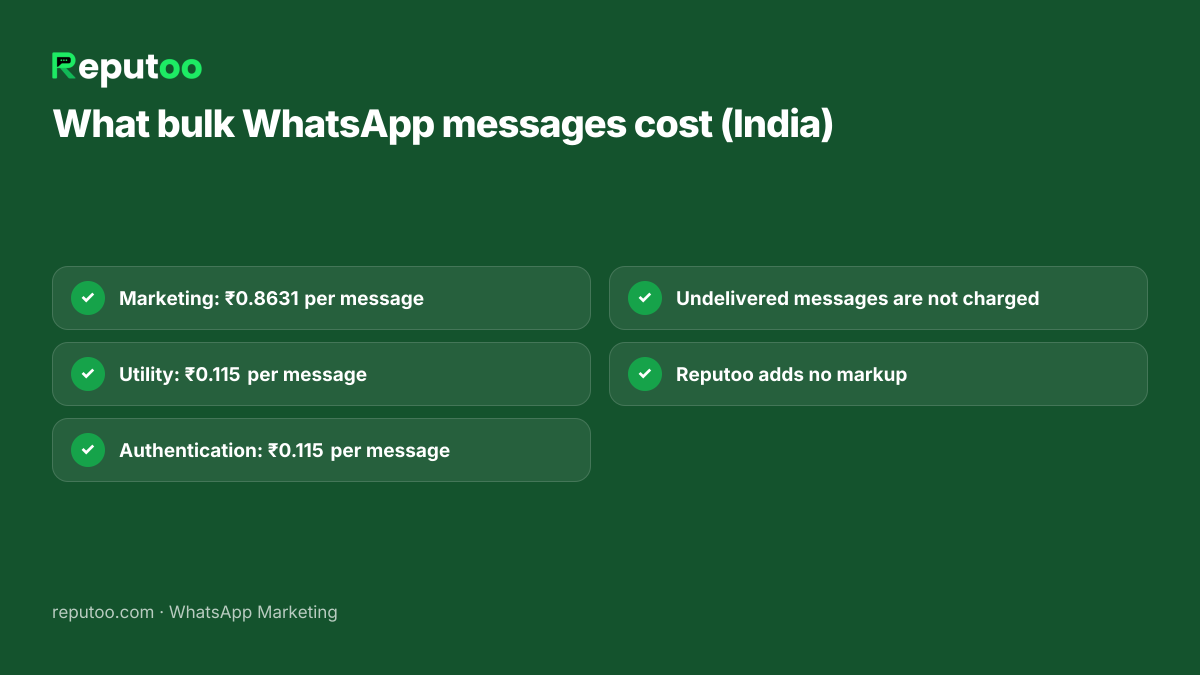
Meta charges per delivered message, by the template's category and the customer's country. On the October 1, 2026 rate card, for Indian numbers, before 18% GST:

Message typeCategoryPer messagePer 1,000
Offers, launches, festival greetings, win-backMarketing₹0.8631≈ ₹863
Reminders, order and payment updatesUtility₹0.115≈ ₹115
One-time passwordsAuthentication₹0.115≈ ₹115

So a sale announcement to 5,000 opted-in customers costs about 5,000 × ₹0.8631 = ₹4,316 in Meta charges, and a reminder to the same 5,000 about ₹575. Messages that are not delivered — a number not on WhatsApp — are not charged. Since 1 October 2026, your replies inside the 24-hour window after a customer writes back are charged at the utility rate.

On top of Meta's charges is the platform's subscription. Reputoo plans start at ₹999 a month and add no markup to Meta's rate; some providers add a few paise to every message, which on a large list quickly matters more than the subscription. Estimate a campaign before you send it with the broadcast cost calculator.

Cost of bulk WhatsApp messages in India per message category
Meta's per-message prices in India (rate card October 1, 2026).
Chapter 06

How to Send Bulk WhatsApp Messages with Reputoo

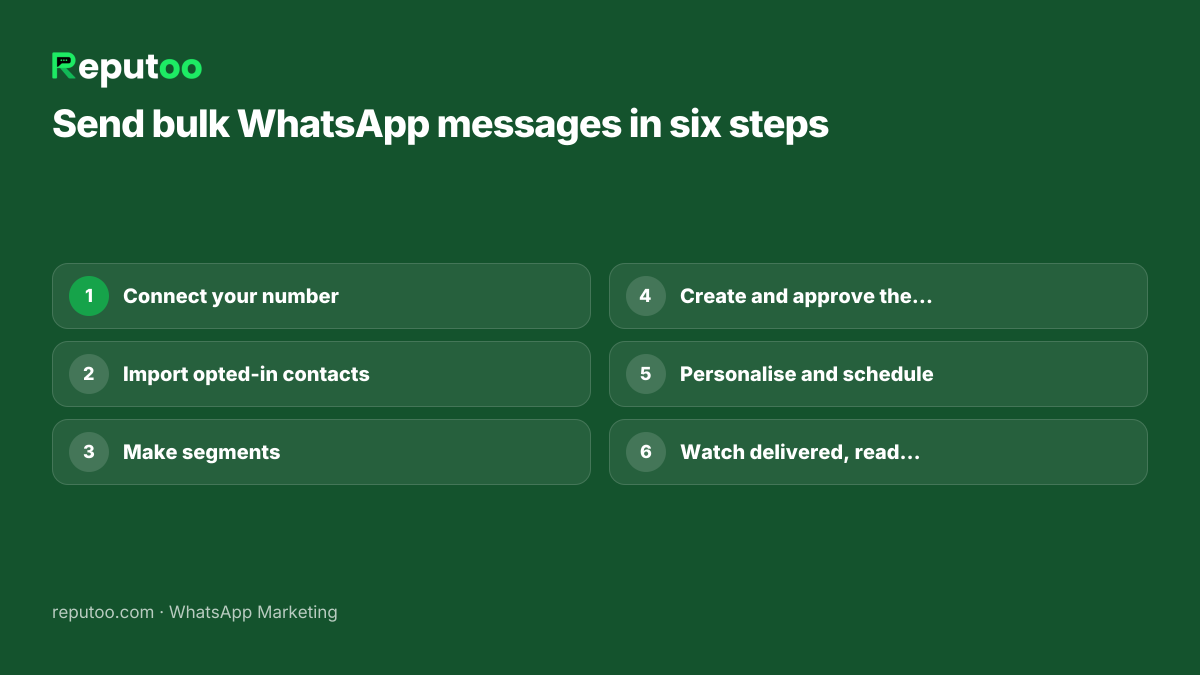
  1. Connect your number. Sign up and connect a WhatsApp number through Meta's own sign-up. The WhatsApp Business Account is created in your Meta business portfolio, so the number stays yours.
  2. Bring in your contacts. Import a CSV or Excel file, or sync customers from Shopify or WooCommerce. Keep only people who agreed to WhatsApp messages, and record where each one opted in.
  3. Make segments. Group customers by tag, source, location, opt-in date or last activity, so each send goes to the people it suits — see WhatsApp audience segmentation.
  4. Create the template. Write the message with variables like {{name}}, add a button or link, choose the category and submit it to Meta. Approval usually takes minutes to a day. Check it first with the template checker.
  5. Personalise and schedule. Map each variable to a contact field, preview a few real messages, and send now or schedule it for when your customers usually read.
  6. Watch the results. Every message shows as delivered, read, clicked, replied or failed. Replies land in the shared inbox so your team can answer them, and campaign revenue shows which sends paid off.

For the campaign side — planning sends across the month, offers and follow-ups — read WhatsApp broadcast campaigns.

How to send bulk WhatsApp messages step by step
From contacts to campaign report.
Chapter 07

Writing Bulk Messages People Do Not Block

Every block or report lowers your number's quality rating, and a low rating shrinks how many customers you can reach. The messages that keep a rating high have a few things in common:

  • They are expected. The customer recognises your brand and remembers agreeing to hear from you.
  • They are personal. The first line uses their name and something they bought or asked about.
  • They are short. One offer, one reason, one button. Long messages get skimmed and ignored.
  • They have a clear next step. "Shop the sale", "Book your slot", "Reply YES to reserve".
  • They are easy to leave. A "Stop offers" button or a reply keyword, honoured immediately.
  • They are not too frequent. For most businesses, one or two marketing messages a week is plenty; daily promotions are the fastest way to a block.

Need inspiration? We collected ready-to-adapt examples in WhatsApp broadcast message examples, and the bulk message personaliser fills a message with each customer's details.

Chapter 08

Choosing a WhatsApp Bulk Sender: A Checklist

Whichever provider you look at, ask the same questions before you import a single contact:

  1. Is it on the official WhatsApp Business API? If it asks you to scan a WhatsApp Web QR code, it is not.
  2. Do they add a margin to Meta's per-message rate? Ask for the per-message price in writing and compare it with Meta's rate card.
  3. Who owns the WhatsApp Business Account? It should sit in your own Meta business portfolio, so you can move providers with your number.
  4. Can you personalise and segment? One message to everyone is the most expensive way to send.
  5. Can you see delivered, read, clicked and replied per message? Without reports you are guessing.
  6. Where do replies go? A bulk send starts conversations; someone has to answer them, ideally in a shared inbox.
  7. Do you get a GST invoice? Important for Indian businesses claiming input tax credit.

Our side-by-side of providers on these points is in WhatsApp broadcast software in India.

Chapter 09

FAQs

What is the best WhatsApp bulk message sender?

One that sends through the official WhatsApp Business API, adds no margin to Meta's per-message rate, lets you personalise and segment, and shows delivered, read, clicked and replied for every message. Tools that work through WhatsApp Web risk getting your number banned.

Can I send bulk WhatsApp messages for free?

Not at scale and not safely. The free WhatsApp Business app allows broadcast lists of up to 256 contacts, and only people who saved your number receive them. Beyond that, the official route charges per delivered message — in India ₹0.8631 for a marketing message and ₹0.115 for a utility message on Meta's October 1, 2026 rate card.

Will my number get banned for sending bulk messages?

Not on the official API if you message only customers who opted in, use approved templates and keep your quality rating healthy. Numbers get banned when automation tools send through WhatsApp Web, or when businesses message people who never agreed to hear from them.

How many bulk WhatsApp messages can I send in a day?

On the API, Meta sets a daily limit on how many different customers you can start conversations with. It starts low for a new number and rises automatically as you use it while your quality rating stays high. Your current limit is shown in WhatsApp Manager.

Do customers need to save my number to get bulk messages?

Not on the WhatsApp Business API — every opted-in customer receives the message. They do need to save your number for a broadcast list sent from the WhatsApp app.

Can I add images, buttons and links to bulk messages?

Yes. Templates can include an image, video or document header, a call-to-action button that opens a link or starts a call, and quick-reply buttons.

Chapter 10

Final Thoughts

A WhatsApp bulk message sender is the fastest way to reach your whole customer list — as long as it is the official kind. Automation tools look free until the day your number stops working; the official WhatsApp Business API costs a little per message and gives you personalisation, reports and a number that keeps getting stronger.

Start with your most loyal, opted-in customers, send one useful message, and read the report. That first campaign tells you more than any tool comparison.

Written by Riya · Reputoo. Riya writes Reputoo’s guides on WhatsApp for business, AI agents and voice AI for Indian businesses.

← Back to all articles
Put it to work

Send Your First Bulk Campaign with Reputoo

1,000+ businesses onboarded · Member of NVIDIA Inception · Official WhatsApp Business API, no per-message markup.

Get the details on WhatsAppNo payment needed. We will message you on WhatsApp.
+91
By sending, you agree to be contacted on WhatsApp. Prefer to write first? Message us