
Generate WhatsApp QR Codes Instantly — Free
Create a WhatsApp QR code for your phone number, website URL, or any text. Customers scan and chat instantly — perfect for menus, posters, business cards, and packaging.
WhatsApp QR Code Generator
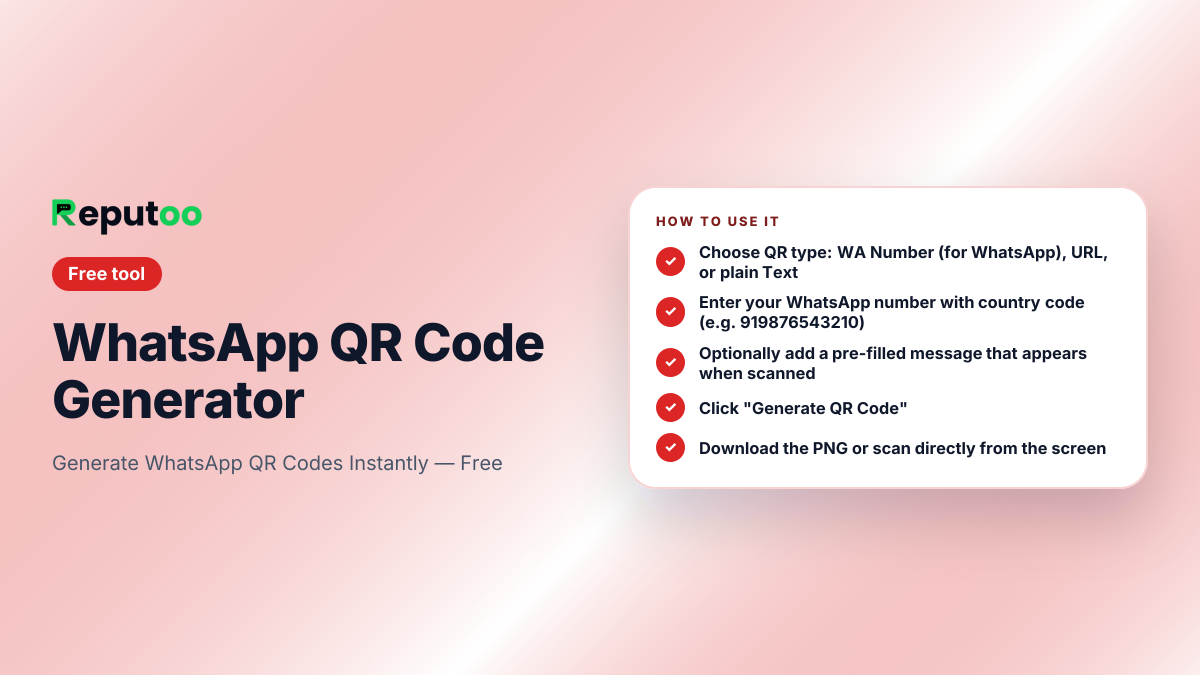
How to Use
- 1
Choose QR type: WA Number (for WhatsApp), URL, or plain Text
- 2
Enter your WhatsApp number with country code (e.g. 919876543210)
- 3
Optionally add a pre-filled message that appears when scanned
- 4
Click "Generate QR Code"
- 5
Download the PNG or scan directly from the screen
Automate This with Reputoo
Send WhatsApp campaigns, answer chats and calls with an AI agent, and book appointments automatically — zero manual work.
Get StartedOther Free Tools
Two different things are called a WhatsApp QR code
Searches for a WhatsApp QR code split almost evenly between two unrelated things, and confusing them wastes a lot of people's time.
The first is the WhatsApp Web login code. That is the square shown at web.whatsapp.com, which you scan from inside the WhatsApp app on your phone — Settings, then Linked devices — to open your own account on a computer. It is generated by WhatsApp, changes every time, expires in under a minute, and cannot be created, saved or shared. If somebody sends you a WhatsApp Web QR code and asks you to scan it, they are trying to take over your account.
The second is a contact QR code, which is what the generator above makes. It encodes a click-to-chat link, so scanning it opens a chat with your business. It is static, it does not expire, and it is meant to be printed and displayed. Everything below is about that one.
What is actually inside a WhatsApp contact QR code
A QR code is a container for text, nothing more. A WhatsApp contact QR code holds a wa.me link — for example https://wa.me/919876543210 — and the phone's camera opens it the same way it would if the person had tapped the link.
Because the payload is just a link, everything true of the link is true of the code. It works whether or not either side has the other saved. It can carry a pre-filled message with ?text=, which is why a table QR can open a chat that already says "Table 7, I would like to order". And it never expires, because there is nothing dynamic in it to expire.
WhatsApp also has its own QR code inside the app, under the profile settings, which does the same job. The reason to generate one instead is control: you can add the pre-filled message, get a file at the size you need, and put it in a design without screenshotting a phone.
Getting a PNG that survives printing
The generator produces a 300×300 PNG, which is right for screens and for small print like a business card. For anything larger, scale it up in an image editor before printing rather than letting the printer stretch it — QR codes are geometric, so they scale cleanly, but a low-resolution file enlarged at print time gets soft edges that scanners struggle with.
The practical rule for physical placement is that the code should be about a tenth of the scanning distance. A code read from arm's length on a menu works at 2-3 cm. A poster read from two metres across a shop needs roughly 20 cm. A window sticker read from the pavement needs more again.
Leave the white margin around the code — that quiet zone is part of how a scanner finds the edges, and designs that crop it or run a background colour up to the squares fail to scan more often than anyone expects. Test the printed code with two or three different phones before ordering a thousand of them.
Where a WhatsApp QR code does real work
The placements that consistently earn their keep are the ones where the customer is already holding their phone and has a reason to act: a restaurant table, a product package, a receipt, a shop window after closing time, an exhibition stand, a delivery box.
A code on a receipt with a pre-filled "I would like to leave feedback on order {{number}}" collects responses that a printed URL never does. A code in a shop window means the enquiry that would have been lost at 9pm arrives in your inbox instead.
Add a line of text telling people what happens when they scan. A bare QR code on a poster gets ignored; "Scan to book an appointment on WhatsApp" gets scanned. The instruction matters more than the size of the code.
Knowing which code brought the conversation
A QR code produces no analytics by itself. If you print the same code on a menu, a receipt and a window sticker, every resulting chat looks identical in your inbox.
The simplest fix costs nothing: generate a separate code for each placement with a different pre-filled message. "Scanned at the table", "Scanned from the window", "From the delivery box" arrive already labelled, and you learn within a week which surfaces are worth reprinting.
The alternative is encoding a tracked redirect on your own domain instead of the wa.me link directly. That gives you scan counts as well as conversation counts, at the cost of a dependency — if that redirect ever breaks, every printed code breaks with it.
Frequently Asked Questions
What is a WhatsApp QR Code?
A WhatsApp QR code encodes a wa.me link — when scanned, it opens a WhatsApp chat with your number directly. Customers don't need to type or save your number.
Where can I use a WhatsApp QR code?
Print it on restaurant menus, business cards, product packaging, store posters, receipts, brochures, or display it on a screen at checkout. Any surface where customers can scan with their phone.
Does the QR code expire?
No. QR codes generated by this tool don't expire — they encode a static wa.me link. As long as your WhatsApp number is active, the QR code will always work.
Can I add a pre-filled message to the QR code?
Yes. Add a message in the optional field — when customers scan your QR code, that message will be pre-typed in the WhatsApp chat box, reducing friction significantly.
What QR code size should I download?
Our generator creates 300×300px PNG files. For print use (posters, menus), use an image editor to scale up — QR codes scale well. For digital use, 300×300px is sufficient.
Can I also generate a QR code for a URL?
Yes. Switch to "URL / Link" mode and enter any URL. The QR code will open that URL when scanned — useful for review links, menus, and landing pages.
How do I scan a WhatsApp QR code?
It depends which code you mean. To log into WhatsApp on a computer, open web.whatsapp.com, then in the WhatsApp app on your phone go to Settings, Linked devices, Link a device, and point the camera at the screen. To scan a business contact code like the ones this tool makes, just use your phone camera — it opens the chat directly, with no need to be inside WhatsApp at all.
Is it safe to scan a WhatsApp QR code someone sends me?
A business contact code is harmless — it only opens a chat. A WhatsApp Web login code is not: scanning one links your account to whatever device generated it, giving that person access to your messages. WhatsApp generates login codes freshly at web.whatsapp.com and they expire within a minute, so anybody sending you a screenshot of one is attempting to take over your account.
How do I download my WhatsApp QR code as a PNG?
Generate the code above and use the download button — it saves a 300×300 PNG. That size is right for screens and small print such as business cards. For posters or window stickers, scale the file up in an image editor before sending it to print rather than letting the printer stretch it.
What size should a printed WhatsApp QR code be?
Roughly a tenth of the distance it will be scanned from. Two to three centimetres works on a menu read at arm's length; a poster read from two metres needs about twenty. Keep the white margin around the code — scanners use it to find the edges, and designs that crop it or run colour up to the squares fail far more often than people expect.
Does a WhatsApp QR code work without saving the number?
Yes. The code encodes a click-to-chat link, so scanning it opens a conversation whether or not either side has the other saved. That is the reason a QR code on a table, a receipt or a shop window converts better than a printed phone number — it removes the copy, switch app and paste steps entirely.
Ready to automate your
WhatsApp marketing?
Reputoo automates everything this tool does — at scale, for every customer, automatically.
Get Started with ReputooCancel anytime · No hidden costs