
WhatsApp Chatbot

How to build a WhatsApp chatbot for your cafe

Most messages a cafe gets on WhatsApp are the same handful of questions, asked at all hours. A chatbot answers those the moment they arrive and passes everything else to a person. Here is what is worth automating for cafes, what a good flow looks like, and where the bot should stop.

Riya · ReputooUpdated 25 September 202610 min read

✓ Fact-checked against Meta’s WhatsApp rate card and vendors’ own pricing pages

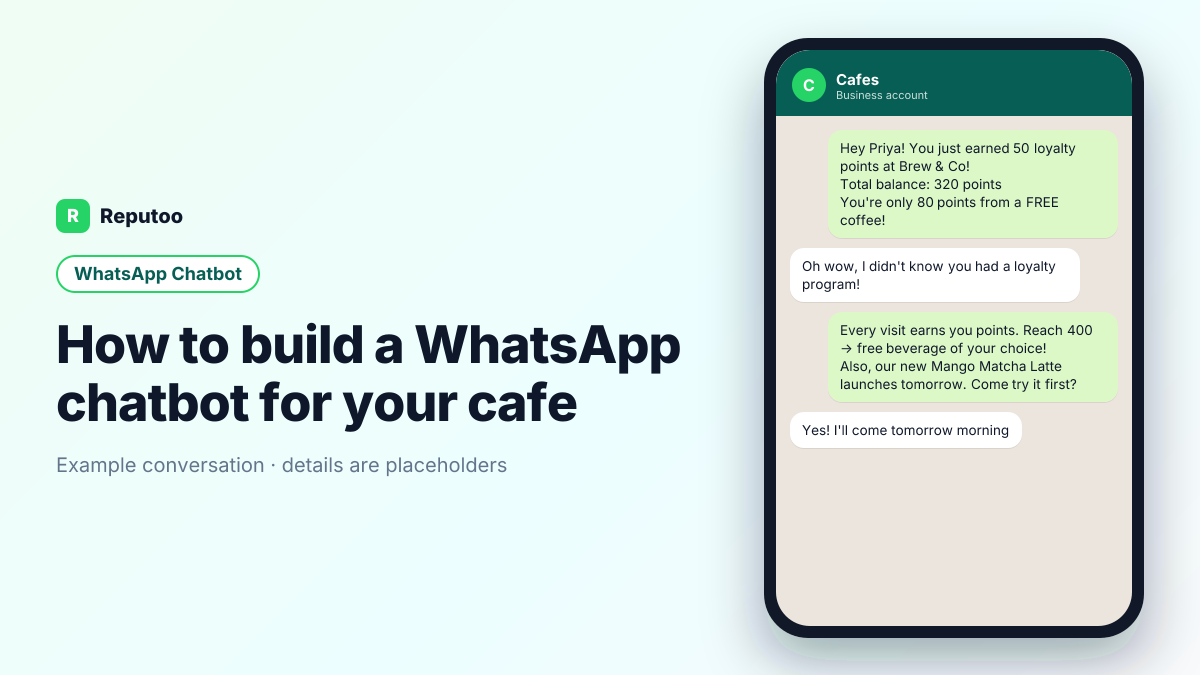
Example WhatsApp conversation for cafes — WhatsApp chatbot
An example WhatsApp chatbot conversation for cafes. Names and details are placeholders.
Key takeaways
  1. 01A cafe chatbot takes pickup orders, runs the loyalty card, shares the menu and books tables.
  2. 02Keep ordering to a few taps: menu sections as lists, modifiers as buttons.
  3. 03Cake orders, allergies and events go to a person with the details collected.
  4. 04Regulars should be able to reorder "the usual" in one tap.
On this page · 29 chapters
  1. 01 · The conversations worth automating for cafes
  2. 02 · The pickup order flow
  3. 03 · An example flow: loyalty point notification + offer
  4. 04 · Reorder "the usual"
  5. 05 · Keyword flows or an AI chatbot?
  6. 06 · The loyalty card in chat
  7. 07 · Sharing the menu
  8. 08 · What the bot should hand to a person
  9. 09 · Setting it up
  10. 10 · Cake and catering enquiries
  11. 11 · Table and space bookings
  12. 12 · Opening hours and "are you open?"
  13. 13 · Languages
  14. 14 · Testing before launch
  15. 15 · Is the chatbot working?
  16. 16 · Busy times and order limits
  17. 17 · Bakery pre-orders
  18. 18 · Students and remote workers
  19. 19 · Payments
  20. 20 · Handing over
  21. 21 · Delivery in the neighbourhood
  22. 22 · Gift cards and vouchers
  23. 23 · Feedback without friction
  24. 24 · Holiday and event days
  25. 25 · Custom drinks and modifiers
  26. 26 · Outlets and pickup points
  27. 27 · Order-ready messages that bring people in
  28. 28 · Opening a new outlet
  29. 29 · Frequently asked questions
Chapter 01

The conversations worth automating for cafes

Start from what customers actually send. Regulars ask what the special is today, whether you have oat milk or gluten-free options, whether they can pre-order for pickup, and whether the space is free for a small meeting.

Then look at what goes wrong today:

  • Customers visit once, never return. They loved the oat latte. They just forgot you exist by next weekend. No reason to come back specifically.
  • New menu items reach nobody. You launched a seasonal special. Instagram showed it to a fraction of followers. WhatsApp reaches them directly.
  • Regulars drift away without anyone noticing. A daily customer stops coming and nothing flags it. By the time you notice, they have a new cafe.

Each of these is a conversation with a predictable shape — a question, a lookup, a confirmation. That shape is what a chatbot handles well.
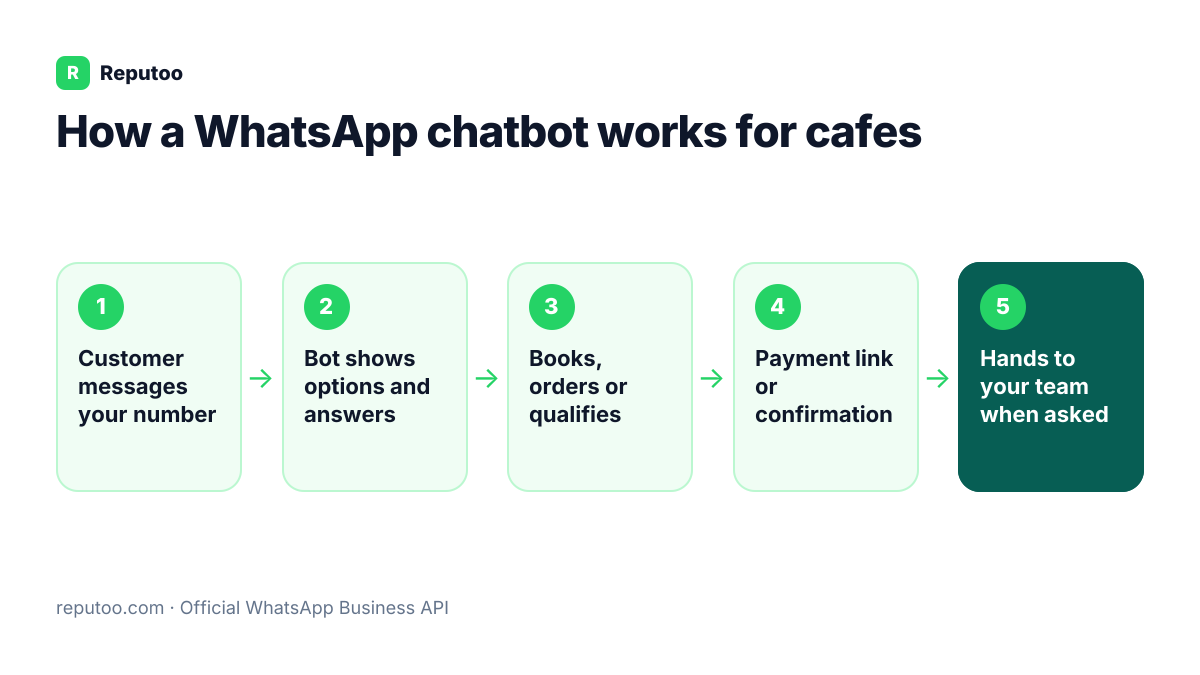
How a WhatsApp chatbot works for cafes: Customer messages your number, Bot shows options and answers, Books, orders or qualifies, Payment link or confirmation, Hands to your team when asked
How a WhatsApp chatbot works for cafes
Chapter 02

The pickup order flow

  1. What would you like? A list message by section — Coffee, Tea, Cold drinks, Bakery, Food.
  2. Size and milk as buttons, with a free-text note for anything else.
  3. Anything else? [Add more] [That's all].
  4. Pickup time — "in 10 minutes" or a set time.
  5. Confirm and pay — total, ready time, payment link or pay at the counter.
Chapter 03

An example flow: loyalty point notification + offer

Example conversation — Loyalty point notification + offer. Names, times and references are placeholders.

Business: ☕ Hey Priya! You just earned 50 loyalty points at Brew & Co!
Total balance: 320 points
🎁 You're only 80 points from a FREE coffee!

Customer: Oh wow, I didn't know you had a loyalty program!

Business: 😄 Every visit earns you points. Reach 400 → free beverage of your choice!
🆕 Also, our new Mango Matcha Latte launches tomorrow. Come try it first?

Customer: Yes! I'll come tomorrow morning 🎉

Notice what the business side does: it answers with the specific detail (time, reference, next step), it asks for one thing at a time, and it gives the customer a one-word way to reply. Those three habits matter more than how clever the bot is.

Chapter 04

Reorder "the usual"

Most morning orders are the same every day. A returning customer who types "usual" or taps [Order again] on yesterday's receipt gets their last order back to confirm, with a ready time. Two taps from "I want coffee" to "it's ready" is what makes regulars use it.

Chapter 05

Keyword flows or an AI chatbot?

Reputoo supports both, and most cafes end up using both:

  • Keyword flows — a fixed menu or trigger word ("MENU", "BOOK", "STATUS") leads down a set path. Predictable, easy to audit, right for anything with a fixed answer.
  • AI chatbot — reads the customer's own words and answers from your knowledge base (website, price list, policies). Right for the long tail of questions nobody wrote a menu item for.

A sensible start for a cafe: keyword flows for the top two or three tasks, AI for everything else, and a person behind both.

Chapter 06

The loyalty card in chat

Customers can type "stamps" to see their balance, and the bot sends the reward code when they earn it. Staff add stamps by scanning the customer's code or entering their number at the counter. It works across outlets if your stamps are recorded centrally.

Chapter 07

Sharing the menu

"Can I see the menu?" gets an instant, readable menu — a phone-friendly image or PDF, or a WhatsApp catalogue with prices — plus today's specials if someone updates them. Keep it current; a menu with old prices causes arguments at the counter.

Chapter 08

What the bot should hand to a person

  • Complaints, refunds and anything where the customer is upset.
  • Anything involving money the bot cannot see — a disputed bill, a custom quote.
  • Health, safety or legal questions.
  • Any customer who asks for a human. Do not make them ask twice.

For cafes specifically: catering orders, event bookings of the space, and anything about a bad experience go to the owner or shift lead.

Handover on Reputoo moves the chat into the shared inbox with the conversation so far, so staff never ask the customer to repeat themselves.

Chapter 09

Setting it up

  1. Connect your WhatsApp number to Reputoo (official API; takes minutes).
  2. Add your website and documents to the knowledge base so the AI answers in your cafe's own terms.
  3. Build keyword flows for the top tasks above. What to connect: A POS with a customer list and, often, a delivery-app tablet; the POS is where loyalty data should sync to.
  4. Choose who gets handed-over chats, and during which hours.
  5. Test from a personal phone, then share the number or a QR code with customers.
Chapter 10

Cake and catering enquiries

The bot collects the date, the occasion, the size or number of people, the flavour, eggless or not, the message on the cake and a reference photo, then hands to the person who takes cake orders. Allergy questions always go to a person.

Chapter 11

Table and space bookings

For small groups the bot books a table by date, time and number of people. For private use of the space, it collects details and hands to the manager, who confirms the minimum spend and deposit.

Chapter 12

Opening hours and "are you open?"

Hours, holidays and early closing on special days live in one place so the bot answers correctly. On days the cafe closes early, it stops accepting pickup orders after the last slot instead of taking orders nobody will make.

Chapter 13

Languages

Customers write orders in their own words and languages: "ek cold coffee kam sugar". Keyword flows need common phrasings; the AI chatbot handles the rest and replies in the customer's language. Add the names customers use for your drinks.

Chapter 14

Testing before launch

  • Order a drink with modifiers and check the barista sees it correctly.
  • Reorder the usual.
  • Check stamps and redeem a reward.
  • Ask for a cake with an allergy and check a person takes over.
  • Order after closing time and check the reply.
Chapter 15

Is the chatbot working?

Watch WhatsApp pickup orders per day, reorders of the usual, loyalty sign-ups and the morning queue. Read handovers weekly for drinks or phrasings the bot misses.

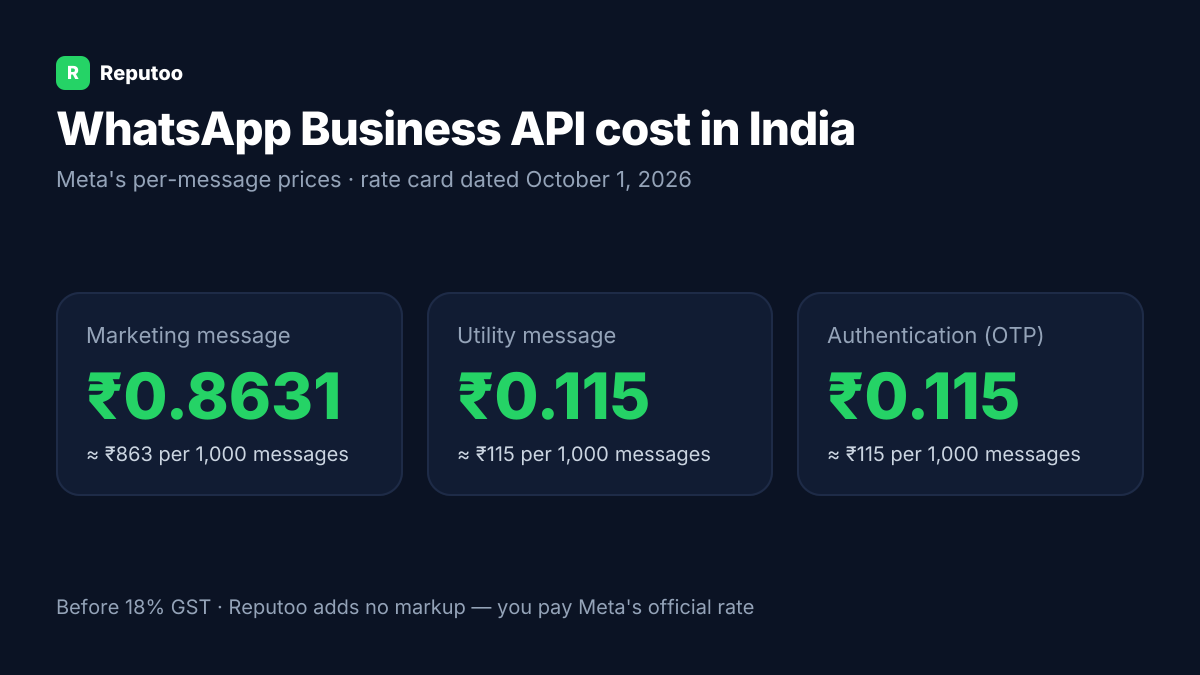
WhatsApp Business API cost in India: marketing ₹0.8631, utility ₹0.115 per message (Meta rate card, October 1, 2026)
Meta's per-message prices in India (rate card dated October 1, 2026), before GST. Reputoo adds no markup.
Chapter 16

Busy times and order limits

At peak times the bar can only make so many drinks. The bot can give realistic ready times based on the orders already queued — 10 minutes at 11 am, 20 at 9 am — rather than promising the impossible. If the queue is too long, it says so honestly and offers a later pickup.

Chapter 17

Bakery pre-orders

For bakeries, the bot takes orders for the next morning — a sourdough, a dozen croissants — with a cut-off time in the evening. Bakers see the total pre-orders before they start, bake to demand and waste less. Customers collect exactly what they wanted, still warm.

Chapter 18

Students and remote workers

Many cafes are workplaces for students and freelancers. The bot answers the questions they ask before coming — Wi-Fi, power outlets, how long they can stay, quiet hours — and can reserve a table in quiet hours if you offer it. These customers visit often and are worth making welcome.

Chapter 19

Payments

Pickup orders can be paid by link in the chat or at the counter, and cake orders take a deposit. The bot confirms payments and sends receipts; refunds go to the manager.

Chapter 20

Handing over

Cake and catering details, allergy questions, complaints and anything the bot cannot place go to the right person with the order and the customer's words attached. The bot tells the customer who will reply and when.

Chapter 21

Delivery in the neighbourhood

If you deliver nearby, the bot checks the address against your delivery area, adds the delivery charge, and gives a realistic time. Orders outside the area get a polite no and the option to pick up. Keeping delivery local keeps drinks hot and riders few.

Chapter 22

Gift cards and vouchers

Cafe gift cards make easy presents. The bot sells them by amount, takes the recipient's name and a message, sends the payment link and delivers the card as an image to forward. When the recipient orders, the bot recognises the code.

Chapter 23

Feedback without friction

After a first order, one question — "How was your coffee?" with two buttons — tells you whether the new customer will come back. "Could be better" goes to the manager. It is also the moment to invite them to the loyalty card.

Chapter 24

Holiday and event days

On festival days and event evenings, the cafe may run a special menu or close early. Update the bot in one place so it offers only what is available and stops taking pickup orders after the last slot.

Chapter 25

Custom drinks and modifiers

Regulars have precise orders: half-sweet, extra shot, no foam, oat milk, very hot. The bot offers the common modifiers as buttons and accepts a free-text note for the rest, then saves the combination as the customer's usual. Baristas see the note clearly on the order, so the drink is right the first time.

Chapter 26

Outlets and pickup points

For cafes with more than one outlet, the bot asks which one before taking the order, and remembers the customer's usual outlet. Orders go to that outlet's bar, and the ready message names it.

Chapter 27

Order-ready messages that bring people in

The "your order is ready" message is the one customers act on immediately. Keep it short, name the outlet and the counter to collect from, and include a line if the order is at a pickup shelf rather than the bar. A clear ready message stops people waiting in the queue for an order that is already sitting there.

Chapter 28

Opening a new outlet

When you open a new outlet, the bot can ask existing customers which outlet they prefer for pickup and move their default, so nobody's usual goes to the wrong bar on the first morning.

Chapter 29

Frequently asked questions

Does a cafe need a developer to build a WhatsApp chatbot?

No. Flows are built in the Reputoo dashboard, and the AI chatbot learns from pages and documents you upload. A developer is only useful if you want to connect a custom in-house system.

Will customers know they are talking to a bot?

They should. Say so in the first message and offer a way to reach a person. Customers mind a slow or wrong answer much more than they mind a bot.

Can customers reorder their usual coffee through a chatbot?

Yes. Returning customers type "usual" or tap Order again on their last receipt, confirm, and get a ready time.

Can the cafe chatbot take cake orders?

It collects the details — date, size, flavour, eggless, message and a reference photo — and hands to the person who takes cake orders. Allergy questions always go to a person.

Does the chatbot manage loyalty stamps?

Yes. Customers check their stamps in chat and receive the reward when earned; staff add stamps at the counter.

Can the cafe chatbot handle delivery?

Yes, within your delivery area — it checks the address, adds the charge and gives a realistic time. Outside the area it offers pickup.

Can customers order from a specific outlet?

Yes. The bot asks which outlet, remembers the usual one, and sends the order to that bar.

Can I send my daily specials to all customers?

Yes. Use WhatsApp Broadcast to send your daily special or new menu item to your full customer list. Broadcasts feel personal — customers receive it as a one-to-one message.

Do customers need to download an app for the loyalty program?

No. Everything works through WhatsApp — the app they already have. No sign-up forms, no loyalty apps, no friction.

Written by Riya · Reputoo. Riya writes Reputoo’s guides on the WhatsApp Business API, chatbots and voice AI for Indian businesses. Prices are checked against Meta’s published rate card (25 September 2026); competitor details come from each vendor’s own site.

← Back to all articles
Put it to work

Set up WhatsApp chatbot for your business.

1,000+ businesses onboarded · Member of NVIDIA Inception · Official WhatsApp Business API, no per-message markup.

Get the details on WhatsAppNo payment needed. We will message you on WhatsApp.
+91
By sending, you agree to be contacted on WhatsApp. Prefer to write first? Message us