
WhatsApp API

WhatsApp Business API for event planners: setup, rules and real costs

The WhatsApp Business app works for an event management company with one phone and one person answering it. Once reminders, confirmations and replies need to go out without someone typing them — or more than one person needs to answer the same number — you need the WhatsApp Business API. This guide covers what Meta asks for, how setup works, and what event planners actually pay per message.

Riya · ReputooUpdated 25 September 202610 min read

✓ Fact-checked against Meta’s WhatsApp rate card and vendors’ own pricing pages

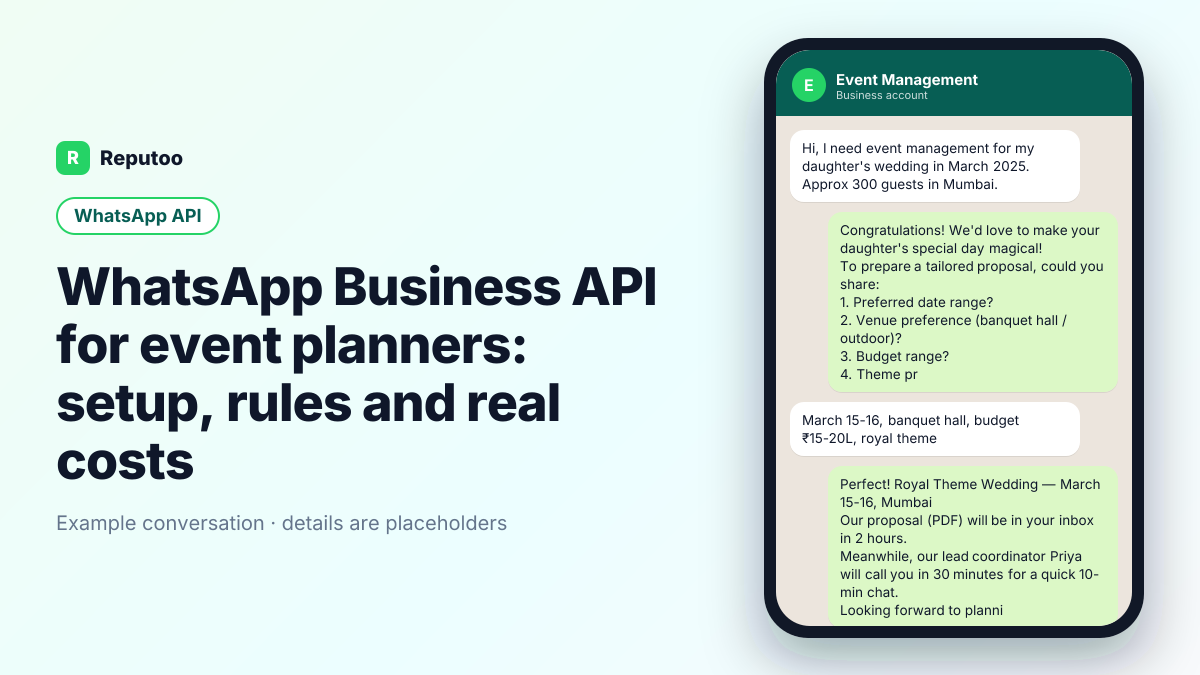
Example WhatsApp conversation for event planners — WhatsApp Business API
An example WhatsApp Business API conversation for event planners. Names and details are placeholders.
Key takeaways
  1. 01An event planner's WhatsApp runs from enquiry to proposal to event day — with the client, the vendors and the guests.
  2. 02Date availability answered in minutes wins bookings; clients shortlist several planners at once.
  3. 03Payment milestones, vendor confirmations and timelines belong in writing, in one thread per event.
  4. 04Guest messages — invitations, RSVPs, directions, schedules — are where WhatsApp saves most time.
On this page · 26 chapters
  1. 01 · Why event planners outgrow the WhatsApp Business app
  2. 02 · What an event management company needs before applying
  3. 03 · Setting it up for your event management company, step by step
  4. 04 · The messages an event business sends
  5. 05 · Winning the enquiry
  6. 06 · Which messages an event management company sends — and what each costs
  7. 07 · One thread per event
  8. 08 · Guests
  9. 09 · Keeping an event management company's number in good standing
  10. 10 · Payment milestones
  11. 11 · Event day
  12. 12 · Corporate events
  13. 13 · Why planners outgrow the WhatsApp app
  14. 14 · A 30-day rollout
  15. 15 · Destination weddings and room blocks
  16. 16 · The run-of-show
  17. 17 · Weather and backup plans
  18. 18 · Décor and design approvals
  19. 19 · Settlement after the event
  20. 20 · Vendor confirmations in writing
  21. 21 · Templates Meta approves for events
  22. 22 · After hours
  23. 23 · Several events at once
  24. 24 · Photos and memories after the event
  25. 25 · Payments and receipts
  26. 26 · Frequently asked questions
Chapter 01

Why event planners outgrow the WhatsApp Business app

The app is fine until these start happening to an event management company:

  • Event inquiry responses are too slow to win business. Family messages 5 event companies for wedding quotations on a Sunday evening. First to respond in 30 mins usually wins the meeting.
  • Client brief collection by call is slow and incomplete. Three phone calls to collect guest count, theme preference, budget, dietary requirements, and venue preferences. A WhatsApp form does it in one go.
  • Event day coordination across WhatsApp groups is chaos. Caterer, DJ, decorator, photographer all in different groups. Something important always gets missed.

The app cannot send on a trigger, share one number across staff, or read your records. The API can. And customers keep asking the same things: clients ask about availability for a date, packages and pricing, venues, vendor options, and changes to the plan.
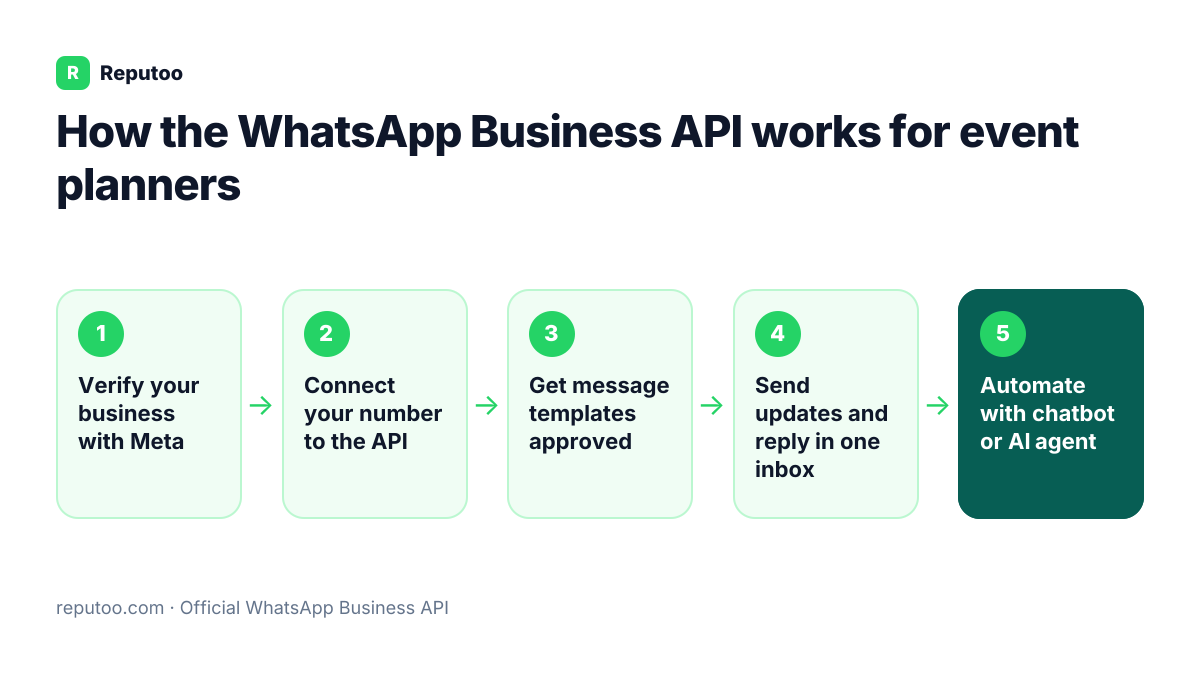
How the WhatsApp Business API works for event planners: Verify your business with Meta, Connect your number to the API, Get message templates approved, Send updates and reply in one inbox, Automate with chatbot or AI agent
How the WhatsApp Business API works for event planners
Chapter 02

What an event management company needs before applying

  • A verified Meta Business account in the event management company's legal name, backed by a registration, GST or utility document.
  • A number not active on the WhatsApp app — your current one works once it is removed from the app.
  • A display name matching the business, and a website or public page Meta can check.
  • Opt-in from every customer you message first. The enquiry and the signed booking; guests of an event can opt in through an RSVP link.
Chapter 03

Setting it up for your event management company, step by step

  1. Connect the number through Meta's embedded signup inside Reputoo, and submit business verification — you can start sending within Meta's starting limit while it is reviewed.
  2. Get your first templates approved for the 2 routine messages listed below; anything outside a customer's 24-hour reply window must be a template.
  3. Wire the triggers to your records. What to connect: A CRM or planning sheet with events, dates and vendors; guest lists often live in spreadsheets.
  4. Put staff on one multi-agent inbox, with conversations assigned so two people never answer the same customer.
Chapter 04

The messages an event business sends

MessageWhenMeta category
Enquiry acknowledged, date availability, packagesWithin minutesUtility or service reply
Proposal and quoteWithin a dayService reply or utility
Booking confirmed, payment scheduleOn signingUtility
Milestone payment due / receivedBy the scheduleUtility
Guest invitation and RSVP requestWeeks beforeUtility, from the host's event
Event-day schedule, directions, parkingDays before and on the dayUtility
Wedding-season and corporate packagesBefore seasonsMarketing

A planner running eight events a month, each with a few hundred guest messages and dozens of client and vendor messages, might send 4,000 utility messages a month — about ₹460 in Meta fees on the October 1, 2026 India rate card, before GST. Seasonal campaigns cost ₹0.8631 per message.

Chapter 05

Winning the enquiry

A couple planning a wedding or a company planning an offsite asks several planners the same day. The one that replies within minutes with date availability, a sense of packages and budget ranges, and a call slot usually gets the meeting. Enquiries from Instagram, the website and referrals should land in one inbox and get that first reply fast, even at night.

Chapter 06

Which messages an event management company sends — and what each costs

Meta charges per delivered template message, and the price depends on the category. For event planners, the day-to-day messages sort like this:

  • Inquiry → personalised response in 60 seconds — service reply
  • Client brief collected via WhatsApp form — utility
  • Pre-event milestone reminders for clients — utility
  • Post-event portfolio + referral request — marketing

Timing matters as much as category. Quick replies to date enquiries, milestone updates as the event approaches, and guest reminders a day before.

A service reply answers a customer who wrote first; from 1 October 2026 Meta charges those at the utility rate. Utility messages (confirmations, reminders, status updates) cost a fraction of marketing messages, so keep them strictly transactional — a discount line inside a reminder makes Meta classify the whole template as marketing.

MarketUtility messageMarketing message
India₹0.115₹0.8631
United States$0.0034$0.0250
United Kingdom$0.0220$0.0635
UAE$0.0157$0.0576

Meta list rates, October 1, 2026. India in INR, plus 18% GST.

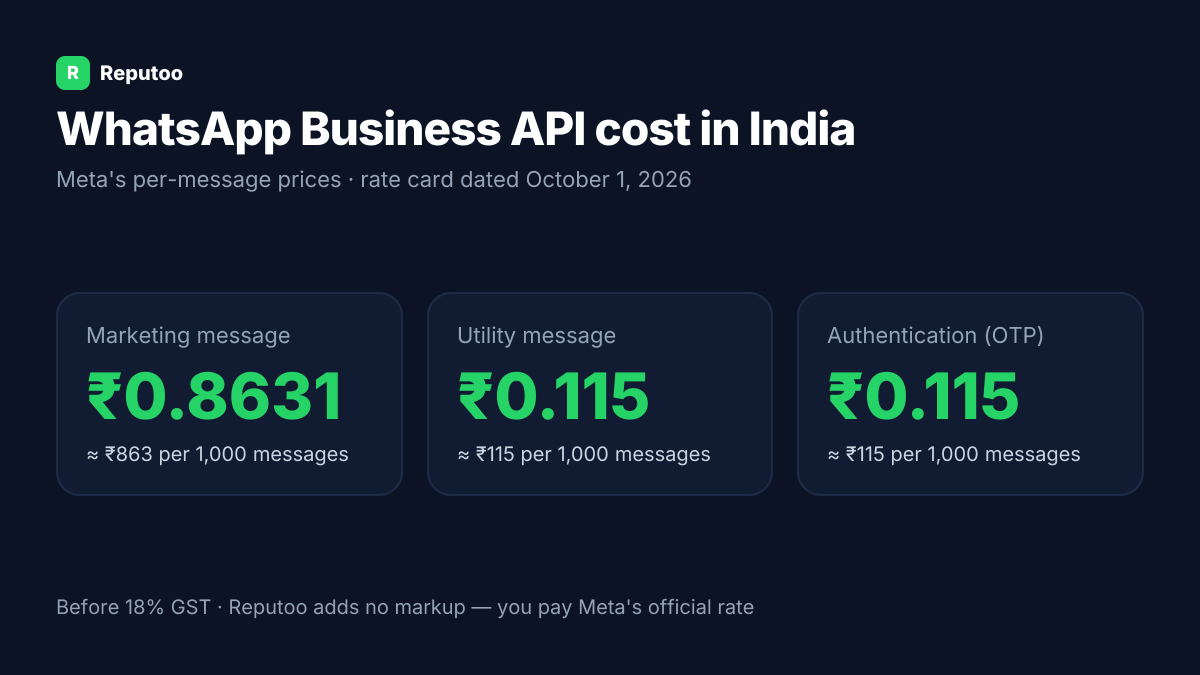
WhatsApp Business API cost in India: marketing ₹0.8631, utility ₹0.115 per message (Meta rate card, October 1, 2026)
Meta's per-message prices in India (rate card dated October 1, 2026), before GST. Reputoo adds no markup.
Chapter 07

One thread per event

An event involves dozens of decisions. A thread per event with the client — proposal, changes, approvals, payment milestones, final timeline — keeps everything in writing and settles "we never agreed to that" before it starts. Vendors — caterers, decorators, photographers, DJs — get their own confirmations with the timings and requirements.

Chapter 08

Guests

Invitations, RSVPs with headcount and dietary needs, venue directions with a map pin, parking, the day's schedule and last-minute changes: guest communication is where WhatsApp saves the most calls. Send only on the host's behalf, to guests the host provided, and stop after the event. A guest list is the host's data, not the planner's marketing list.

Chapter 09

Keeping an event management company's number in good standing

Meta rates every number on how customers react. For event planners, the risk is usually messaging the whole contact list about something only some of them asked for. Send reminders only to people with a booking or order, promotions only to people who opted in to them, and never use a bulk-sender tool on the ordinary app — that is the route to a banned number. The full list of what Meta checks is in our WhatsApp Business API guide.

Chapter 10

Payment milestones

Events are paid in stages: booking advance, pre-event instalments, balance before or on the day. Reminders before each milestone, payment links and receipts keep money matters clear and unemotional — important when the client is also stressed about the event itself.

Chapter 11

Event day

On the day, a coordinator needs to reach vendors and the family instantly. A shared inbox where the team sees vendor arrivals, delays and client requests means nothing depends on one person's phone battery.

Chapter 12

Corporate events

Corporate offsites, launches and conferences involve an HR or marketing contact, attendee lists, travel and accommodation, and invoices with company details. Attendees get their own logistics messages; the company gets one thread for approvals and billing.

Chapter 13

Why planners outgrow the WhatsApp app

Planners juggle dozens of WhatsApp groups per event on personal phones — family groups, vendor groups, guest groups. Things get missed, and guest numbers get exposed to everyone. The API sends guest messages one to one, keeps client and vendor threads on the business number, and gives the team shared visibility.

Chapter 14

A 30-day rollout

  1. Week 1: move to the API; get enquiry, booking, payment and guest templates approved.
  2. Week 2: fast replies to every enquiry with availability.
  3. Week 3: one thread per event for clients and vendors; payment reminders.
  4. Week 4: guest invitations, RSVPs and event-day messages for the next event.
Chapter 15

Destination weddings and room blocks

Destination events add travel and accommodation. Guests need their hotel, room type, check-in time, airport pickup and the event schedule; the host needs a live count of arrivals. Individual messages to each guest with their own details, and a daily summary to the host, replace a chaotic family group.

Chapter 16

The run-of-show

A minute-by-minute run-of-show shared with every vendor and the coordination team, with updates sent the moment anything changes, keeps a large event on schedule. Vendors confirm receipt; the coordinator sees who has not.

Chapter 17

Weather and backup plans

Outdoor events need a backup. When the forecast changes, a clear message to the client with the backup plan and a decision deadline, then to vendors and guests with any change of venue or timing, avoids confusion on the day.

Chapter 18

Décor and design approvals

Mood boards, stage renders and décor samples can be shared in the client's thread for approval with a button, so every design decision has a date and a yes. Late changes are then clearly late, with their cost stated.

Chapter 19

Settlement after the event

After the event, a final statement — advances, extras added on the day, the balance — with the payment link and receipts closes the account cleanly. Clear settlements are what turn a client into a referrer.

Chapter 20

Vendor confirmations in writing

Each vendor — caterer, decorator, sound, photographer — should confirm in writing what they will deliver, when they will arrive and who their on-site contact is. A confirmation template per vendor, acknowledged with a button, means the coordinator knows before the day who has confirmed and who has not.

Chapter 21

Templates Meta approves for events

Keep booking, payment, vendor and guest templates factual — event name, date, time, venue, amounts, contacts. Guest invitations sent on a host's behalf should say whose event it is. Seasonal promotions go in separate marketing templates to people who opted in.

Chapter 22

After hours

Couples browse planners late at night. An instant acknowledgement with date availability, or a chatbot that checks it, keeps the enquiry from going to the next planner who answers first in the morning.

Chapter 23

Several events at once

In peak season a planner runs several events in the same week. Tagging every conversation by event in the shared inbox — client, vendors, guests — keeps each event's messages together, so a coordinator switching between events never confuses one family's plan with another's.

Chapter 24

Photos and memories after the event

After the event, sharing the photographer's delivery link or a highlights video with the host — not the guest list — closes the relationship on a high note. It is also the moment to ask whether the host is happy for some photos to be used in your portfolio.

Chapter 25

Payments and receipts

Advance, milestone and balance links with receipts in the client thread give a clear record — useful when a family splits costs or a company needs invoices with GST details.

Chapter 26

Frequently asked questions

Can an event management company keep its existing WhatsApp number on the API?

Yes. Delete the number from the WhatsApp or WhatsApp Business app first, then register it on the API. Existing chat history on the phone does not transfer, so export anything you need before switching.

How much does the WhatsApp Business API cost for event planners?

Two parts: Meta's per-message charge (in India ₹0.115 per utility message and ₹0.8631 per marketing message, plus GST, on the October 1, 2026 rate card) and the platform plan. Reputoo does not add a markup per message; plan prices are on the pricing page.

Can an event planner send invitations and collect RSVPs on WhatsApp?

Yes — invitations, RSVPs with headcount and dietary needs, directions and schedules, sent one to one to guests the host provided.

Should event planners use WhatsApp groups for guests?

One-to-one messages are better: groups expose every guest's number and bury important updates.

Can planners send payment reminders on WhatsApp?

Yes, before each milestone, with a payment link and receipt — utility messages that keep money matters clear.

Can planners send each vendor their run-of-show on WhatsApp?

Yes, with a button to confirm receipt, so the coordinator knows who has confirmed before the day.

Can I collect detailed client event briefs via WhatsApp?

Yes. The bot asks structured questions — venue preference, theme, dietary requirements, entertainment, decor style — and collects complete brief without phone calls. Teams save 3+ hours per client.

How do I coordinate with vendors on event day via WhatsApp?

Create a centralised vendor coordination flow in Reputoo's inbox. All vendor conversations in one place — caterer, decorator, DJ, photographer — with conversation history and assignment tracking.

Written by Riya · Reputoo. Riya writes Reputoo’s guides on the WhatsApp Business API, chatbots and voice AI for Indian businesses. Prices are checked against Meta’s published rate card (25 September 2026); competitor details come from each vendor’s own site.

← Back to all articles
Put it to work

Set up WhatsApp Business API for your business.

1,000+ businesses onboarded · Member of NVIDIA Inception · Official WhatsApp Business API, no per-message markup.

Get the details on WhatsAppNo payment needed. We will message you on WhatsApp.
+91
By sending, you agree to be contacted on WhatsApp. Prefer to write first? Message us