
WhatsApp Appointment Reminders: How to Reduce No-Shows and Improve Patient Attendance
Learn how WhatsApp appointment reminders help healthcare providers reduce no-shows, improve patient attendance, and save staff time.
Riya
Reputoo
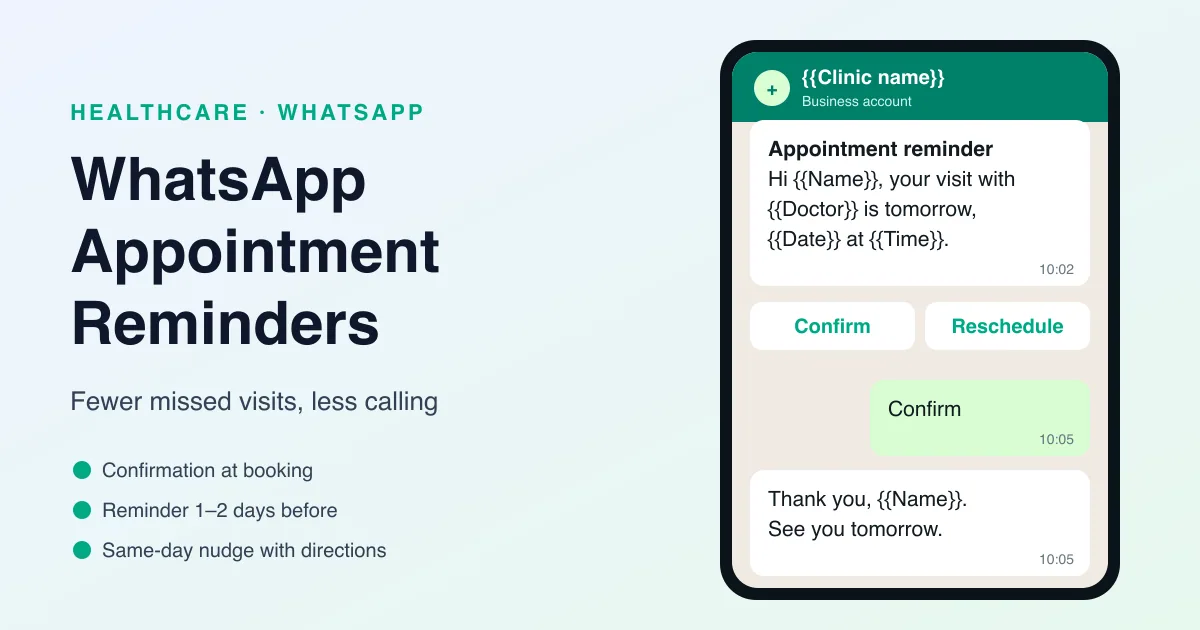
Missed appointments can create serious problems for healthcare providers. They waste staff time, disrupt schedules, and reduce the number of patients you can serve. For patients, a missed appointment can delay treatment and create more stress. That is why WhatsApp appointment reminders are such a practical solution.
Instead of relying only on phone calls or email, healthcare teams can send reminder messages through WhatsApp, a channel patients already use every day. These reminders are quick, easy to read, and much more likely to be seen in time. When used properly, they can reduce no-shows and improve the entire appointment experience.
For clinics, dental practices, specialists, and other healthcare providers, appointment reminders are one of the simplest ways to improve communication without adding extra manual work.
What Are WhatsApp Appointment Reminders?
WhatsApp appointment reminders are automated or manual messages sent to patients before their scheduled visit. These messages usually include the appointment date, time, location, and any important instructions.
They help patients remember their visit and reduce the chance that they forget or miss the appointment.
Common reminder messages can include:
- Appointment confirmation
- Visit date and time
- Clinic address or link
- Required instructions before the visit
- Contact details for rescheduling
Because WhatsApp is direct and familiar, patients are more likely to notice these reminders quickly.
Why Appointment Reminders Matter in Healthcare
In healthcare, missed appointments affect both operations and patient care. When a patient does not show up, the time slot is lost and other patients may have to wait longer for care.
Appointment reminders help because they:
- Reduce no-shows
- Improve attendance rates
- Save staff time
- Help patients stay organized
- Improve the overall patient experience
For providers, this means better schedule efficiency and fewer empty time slots.
Why WhatsApp Works Better Than Traditional Reminder Methods
Email reminders can be overlooked. Phone calls take staff time and may go unanswered. WhatsApp gives you a more immediate and practical way to reach patients.
Here’s why it works well:
- Patients already check WhatsApp often
- Messages are usually seen quickly
- Reminders feel more personal
- Patients can reply if they need to reschedule
- Automation reduces manual follow-up work
That makes WhatsApp especially helpful for busy clinics and practices with many daily appointments.
Best Use Cases for WhatsApp Appointment Reminders
Appointment reminders can be used in several ways across healthcare.
1. Initial appointment confirmation
Send a message as soon as the booking is made so the patient knows the appointment is confirmed.
2. Reminder before the visit
Send a reminder one or two days before the appointment.
3. Same-day reminder
Send a final reminder a few hours before the visit.
4. Rescheduling support
If the patient cannot make it, make it easy for them to reply and reschedule.
5. Instruction reminders
Send helpful instructions such as fasting requirements, documents to bring, or arrival details.
These reminders make the visit smoother for both the patient and the provider.
Benefits of WhatsApp Appointment Reminders
Adding WhatsApp reminders to your workflow has clear advantages.
Fewer missed appointments
Patients are less likely to forget their scheduled visit.
Better patient communication
Important appointment details arrive in a format patients actually read.
Less admin work
Your team does not have to make as many manual calls.
Improved patient experience
Patients feel more informed and supported.
Better schedule efficiency
Fewer no-shows mean more predictable operations.
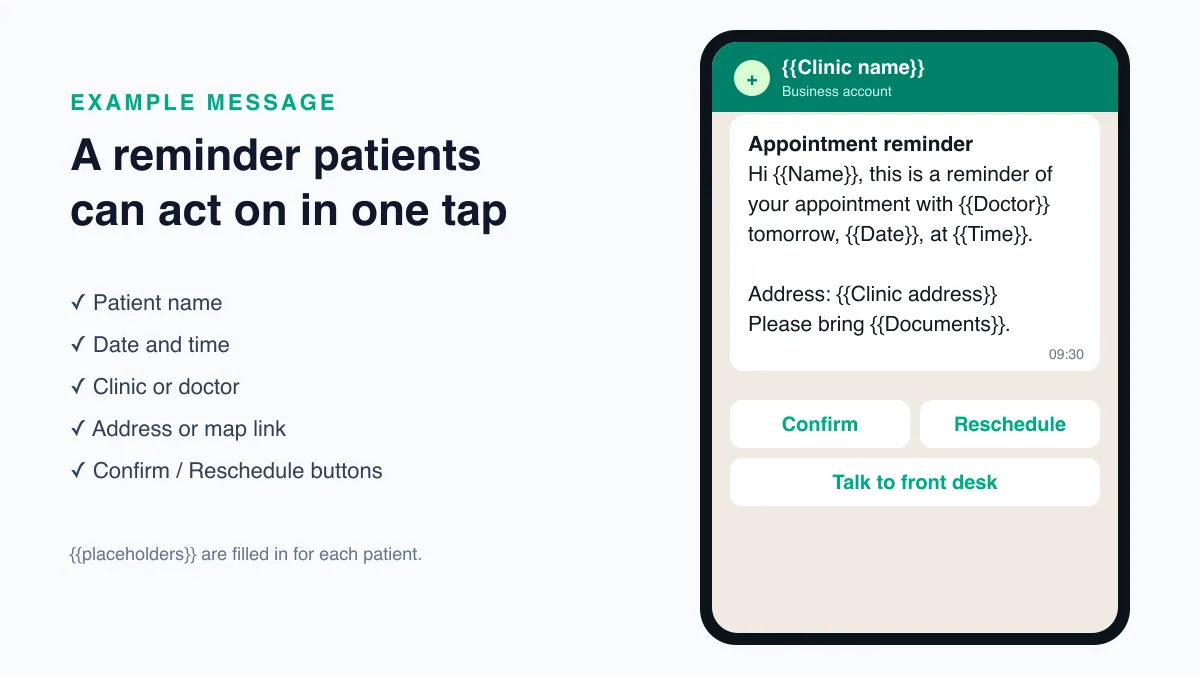
What a Good Reminder Message Should Include
A useful reminder should be short, clear, and easy to act on.
It should include:
- Patient name
- Appointment date and time
- Clinic or provider name
- Location or meeting link
- Rescheduling instructions if needed
- A polite and professional tone
The goal is to remind, not overwhelm.
Why Reputoo Helps with Appointment Reminders
Reputoo helps healthcare providers automate WhatsApp appointment reminders so they can save time and reduce missed visits.
With Reputoo, you can:
- Send appointment confirmation messages
- Automate reminder workflows
- Improve patient communication
- Reduce manual calling
- Handle reminders consistently
That makes it easier for clinics and practices to stay organized and improve attendance.
Best Practices for WhatsApp Appointment Reminders
If you want your reminder system to work well, follow these best practices:
Send reminders on time
Use a schedule that gives patients enough notice.
Keep the message short
Patients should be able to read it quickly.
Include clear action steps
If they need to confirm or reschedule, make that obvious.
Be professional
Healthcare communication should feel respectful and trustworthy.
Make it easy to reply
Patients should know how to ask questions or change the appointment.
Common Mistakes to Avoid
A reminder system only works if it is clear and well timed.
Avoid these mistakes:
- Sending reminders too late
- Making messages too long
- Leaving out the appointment details
- Using an unprofessional tone
- Not offering rescheduling support
The reminder should reduce confusion, not create more of it.
A Simple Reminder Schedule You Can Start With
There is no single schedule that suits every practice, but most clinics can start with three messages and adjust from there:
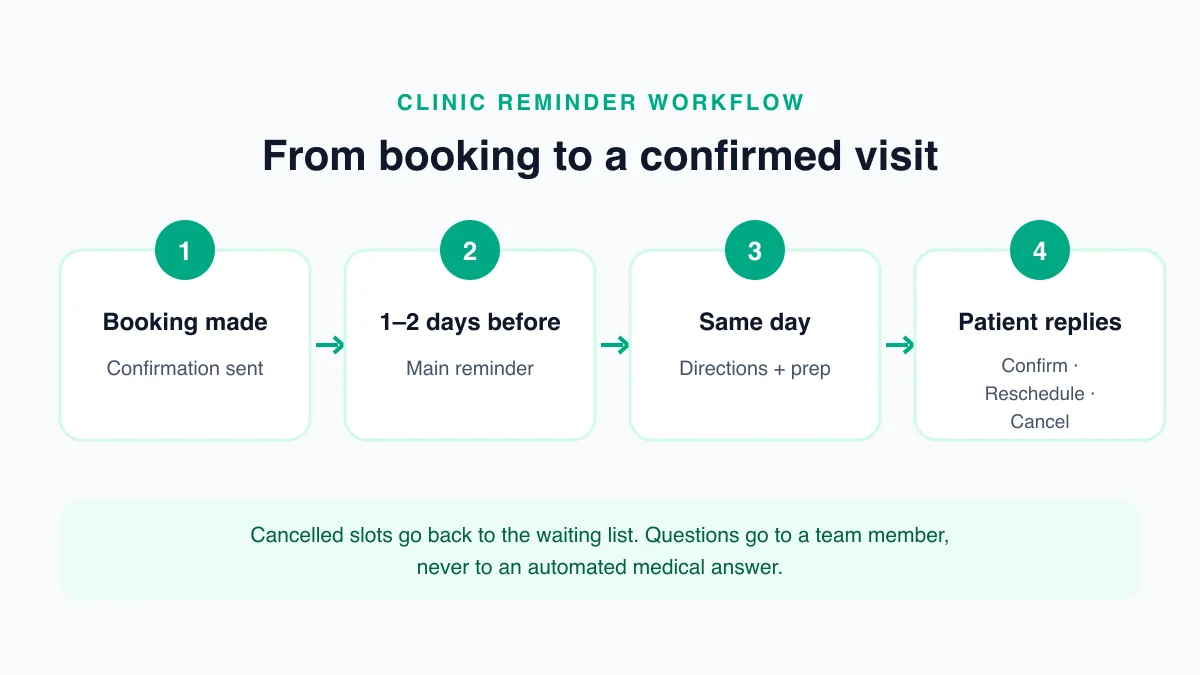
- At booking: a confirmation with the date, time, doctor or department, and address. This is also the moment to tell the patient that reminders will come on WhatsApp.
- One or two days before: the main reminder, with a way to confirm or ask for a new time. Sending it a day or two ahead leaves your team time to offer the slot to someone else if the patient cannot come.
- A few hours before: a short same-day nudge with the address, a map link, and any arrival instructions.
Procedures that need preparation, such as fasting before a blood test or stopping a medicine before a scan, deserve their own instruction message early enough for the patient to follow it. For follow-up visits booked weeks ahead, an extra reminder a week before helps patients who plan travel or time off work.
Whatever schedule you choose, keep it consistent. Patients learn when to expect your messages, and your staff know which patients have already been reminded.
Example Reminder Templates You Can Adapt
On the WhatsApp Business Platform, reminders are sent as message templates. The numbered placeholders below, such as {{1}}, are filled with each patient's details when the message is sent.
Booking confirmation
Hello {{1}}, your appointment with {{2}} is confirmed for {{3}} at {{4}}. Address: {{5}}. Reply to this message if you need to change the time.
Reminder one day before
Hi {{1}}, this is a reminder of your appointment with {{2}} tomorrow, {{3}}, at {{4}}. Please tap Confirm, or Reschedule if you need another time.
Same-day reminder
Hi {{1}}, we look forward to seeing you today at {{2}} at {{3}}. Please arrive 10 minutes early and bring {{4}}.
Buttons such as Confirm and Reschedule are quick-reply buttons added to the template, so the patient can answer with one tap instead of typing. You can find more ready-made wording in our WhatsApp reminder message templates.
WhatsApp Rules That Apply to Appointment Reminders
WhatsApp has clear rules for businesses that message people, and appointment reminders sit inside them. Following them keeps your number in good standing and your messages welcome.
- Get opt-in first. WhatsApp's Business Messaging Policy says you may only contact people who have given you their number and have opted in to receive messages from you (https://business.whatsapp.com/policy). Ask at booking, on your website form, or at the front desk, and record the answer.
- Use templates outside the 24-hour window. When a patient messages you, a 24-hour customer service window opens. Outside that window, a business can only send approved template messages (https://developers.facebook.com/docs/whatsapp/pricing). Reminders are usually sent days after the last conversation, so they are templates.
- Choose the right category. Meta groups templates into marketing, utility, and authentication. Utility templates are for transactional or informational messages, which is where an appointment reminder belongs. Keep promotions out of reminder templates so they stay in that category.
- Allow time for approval. Each template is reviewed by Meta before you can use it, and review can take up to 24 hours (https://developers.facebook.com/docs/whatsapp/business-management-api/message-templates). Create your templates before you need them.
- Offer a way to reach a person. The policy also asks businesses that automate replies to give people a clear path to a human. A line such as "Reply STAFF to speak to our front desk" is enough.
WhatsApp charges per template message at Meta's published rates, which vary by country and category. You can estimate your monthly cost with our WhatsApp API cost calculator.
Protecting Patient Information in Reminders
A reminder can be seen on a lock screen or by someone else who uses the phone, so write it as if it might be. Mention the time, place, and doctor or department, and leave out diagnoses, test names that reveal a condition, and results. If a patient needs detailed instructions, ask them to reply or call so you can share the details in a private conversation.
In India, a patient's phone number and appointment details are personal data under the Digital Personal Data Protection Act, 2023 (https://www.meity.gov.in/data-protection-framework). Collect only what the reminder needs, tell patients why you are collecting it, and let them stop reminders if they ask.
How to Set Up WhatsApp Appointment Reminders, Step by Step
Setting up reminders takes a few steps, most of which you do once.
- Get access to the WhatsApp Business API. Automated reminders run on the WhatsApp Business Platform rather than the regular WhatsApp Business app. Our guide on how to get the WhatsApp Business API walks through it.
- Collect consent at booking. Add a WhatsApp opt-in line to your booking form, phone script, or registration desk.
- Write and submit your templates. Create the confirmation, reminder, and same-day templates as utility templates and submit them for approval.
- Connect your appointment data. Reminders need the patient's name, number, and appointment time from wherever bookings live, whether that is a calendar, your clinic software, or a booking agent such as Reputoo's AI booking agent for clinics.
- Set the schedule. Decide when each message goes out, relative to the appointment time.
- Test with your own number. Book a test appointment and check every message, button, and reply before patients see it.
- Train the front desk. Make sure staff know where replies arrive and how to reschedule from them.
Handling Patient Replies
A reminder starts a conversation, and the replies are where most of the value is. Plan for the common answers before you switch reminders on:
- Confirm: mark the appointment as confirmed so staff can see who is expected.
- Reschedule: offer the next available times, or pass the chat to the front desk to arrange one.
- Cancel: free the slot straight away so it can be offered to another patient on your waiting list.
- A question: route it to a team member, especially anything clinical. An automated reply should never give medical advice.
Because the patient has just replied, the 24-hour customer service window is open, and your team can answer in a normal free-form message.
How to Measure Whether Reminders Are Working
Look at your own numbers before and after you start. Useful measures include:
- The no-show rate, by week and by department
- How many patients confirm, reschedule, or cancel after a reminder
- How many cancelled slots were filled again
- How much time the front desk spends on reminder calls
Review them after the first month, then adjust the timing or wording of the message that gets the fewest responses. Small changes, such as sending the main reminder in the morning instead of the evening, are easy to test one at a time.
For a wider view of how WhatsApp fits into a practice, from reminders to follow-ups and patient updates, read our guide to WhatsApp marketing software for healthcare.
Final Thoughts
WhatsApp appointment reminders are one of the simplest and most effective ways to reduce no-shows and improve patient attendance. They help your team stay organized while giving patients the information they need at the right time.
If your healthcare practice wants better communication and fewer missed visits, appointment reminders are a smart place to start.
Automate Appointment Reminders with Reputoo
Frequently Asked Questions
What are WhatsApp appointment reminders?
They are messages sent to patients to remind them of their upcoming healthcare appointment.
Do WhatsApp reminders reduce no-shows?
Yes. They help patients remember appointments and improve attendance.
Can appointment reminders be automated?
Yes. Platforms like Reputoo can automate reminder workflows.
Are WhatsApp reminders better than email?
For many patients, yes. WhatsApp is usually seen faster and feels more direct.
Can I send appointment confirmation messages too?
Yes. Confirmation and reminder messages work well together.
Ready to implement this for your business?
Get started with Reputoo — Official WhatsApp Business API, cancel anytime.
Get StartedRelated Articles
WhatsApp Marketing
WhatsApp Customer Support for Healthcare: How to Improve Response Time and Patient Experience
9 min
WhatsApp Marketing
WhatsApp Medical Appointment Automation: How to Save Time and Improve Patient Scheduling
9 min
WhatsApp Marketing
WhatsApp Follow-up Messages for Patients: How to Improve Care, Communication, and Patient Engagement
9 min