
WhatsApp Medical Appointment Automation: How to Save Time and Improve Patient Scheduling
Learn how WhatsApp medical appointment automation helps healthcare providers automate booking, reminders, and patient communication.
Riya
Reputoo
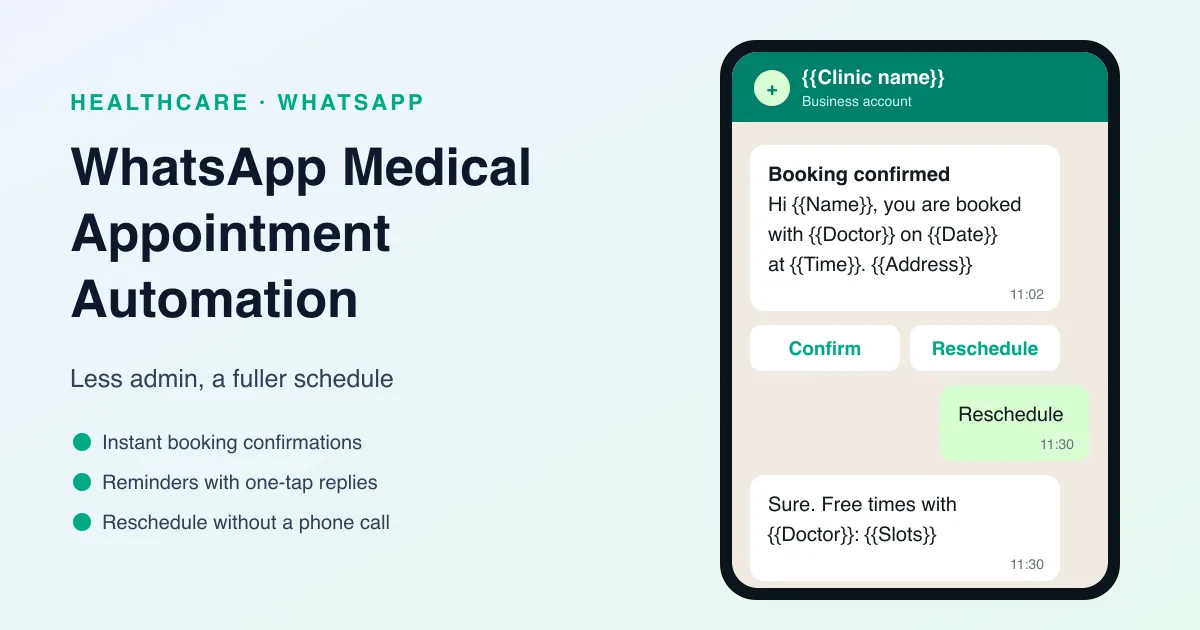
Managing medical appointments takes time. Patients book visits, cancel them, reschedule them, or forget them altogether. Staff spend hours handling confirmations, reminders, and follow-ups. For healthcare providers, this can create unnecessary admin work and scheduling gaps. That is why WhatsApp medical appointment automation is so useful.
By automating appointment-related communication through WhatsApp, healthcare teams can reduce manual effort, improve attendance, and make the scheduling process easier for patients. Instead of relying on phone calls or scattered follow-ups, the clinic can manage the workflow in a more organized and reliable way.
For clinics, hospitals, dental practices, and specialists, automation helps keep the schedule running smoothly.
What Is WhatsApp Medical Appointment Automation?
WhatsApp medical appointment automation is the use of software to automatically handle appointment-related tasks on WhatsApp. This can include booking confirmations, reminders, rescheduling messages, and follow-up notifications.
It can be used for:
- New appointment confirmations
- Reminder messages
- Rescheduling support
- Visit instructions
- Follow-up reminders
- Booking-related communication
The goal is to reduce manual work while keeping communication clear and timely.
Why Appointment Automation Matters in Healthcare
Appointment management is one of the most repetitive parts of healthcare operations. If it is done manually, staff have to spend time sending messages, making calls, and tracking responses.
Automation helps because it:
- Reduces admin workload
- Improves communication consistency
- Lowers the chance of missed appointments
- Helps patients stay informed
- Saves staff time
That makes scheduling more efficient and the patient experience smoother.
Why WhatsApp Is a Good Channel for Appointment Automation
WhatsApp is a strong fit for appointment workflows because patients already use it regularly and respond quickly to messages.
Here’s why it works:
- Patients see messages fast
- Responses are easy
- It feels more personal than email
- It is suitable for reminders and confirmations
- It can support automated two-way communication
This makes WhatsApp ideal for handling appointment tasks in a simple and effective way.
Best Use Cases for Medical Appointment Automation
Healthcare providers can automate a variety of appointment-related messages.
1. Booking confirmation
Send a message as soon as the appointment is scheduled.
2. Reminder messages
Notify the patient before the visit so they remember to attend.
3. Rescheduling options
Allow patients to easily request a change if needed.
4. Visit instructions
Send important preparation steps before the appointment.
5. Follow-up reminders
Encourage patients to book their next visit or complete a follow-up step.
6. Cancellation support
Let patients notify the clinic if they cannot attend.
These automated messages make the appointment process more efficient for everyone.
Benefits of WhatsApp Medical Appointment Automation
Using WhatsApp to automate appointment workflows brings several benefits.
Less manual work
Staff spend less time sending repetitive messages.
Fewer no-shows
Automated reminders help patients remember their visit.
Better patient communication
Messages are delivered clearly and quickly.
More efficient scheduling
The clinic can manage more appointments without extra effort.
Better patient experience
Patients get helpful reminders and clearer next steps.
What a Good Automation Flow Should Include
A good appointment automation setup should be simple and clear.
It should include:
- A trigger for booking or timing
- A short and useful message
- Clear appointment details
- A rescheduling option if needed
- A professional tone
The goal is to make the workflow easy for patients and efficient for the clinic.
Why Reputoo Helps with Appointment Automation
Reputoo helps healthcare teams automate appointment-related WhatsApp communication in one organized system.
With Reputoo, you can:
- Automate booking confirmations
- Send reminder workflows
- Reduce manual scheduling work
- Improve patient communication
- Keep appointment messaging consistent
That makes it easier to manage scheduling without creating extra work for staff.
Best Practices for WhatsApp Appointment Automation
If you want better results, keep these best practices in mind:
Keep messages short
Patients should understand the message quickly.
Automate only the important steps
Focus on reminders, confirmations, and follow-ups first.
Make rescheduling simple
If a patient cannot attend, they should know what to do next.
Stay professional
Healthcare messages should be clear and respectful.
Test timing
See when reminders work best for your patient base.
Common Mistakes to Avoid
Appointment automation works best when it is well designed.
Avoid these mistakes:
- Sending too many messages
- Making messages too long
- Forgetting appointment details
- Not offering a way to reschedule
- Using unclear instructions
The automation should make scheduling easier, not more confusing.
What to Automate and What to Keep Human
Automation is best at tasks that are the same every time. A useful test: if two receptionists would send exactly the same message, it can be automated. If the answer depends on the patient's health or circumstances, a person should handle it.
Good candidates for automation:
- Booking confirmations with date, time, doctor, and address
- Reminders before the visit
- Preparation instructions that the doctor has written once for a type of visit
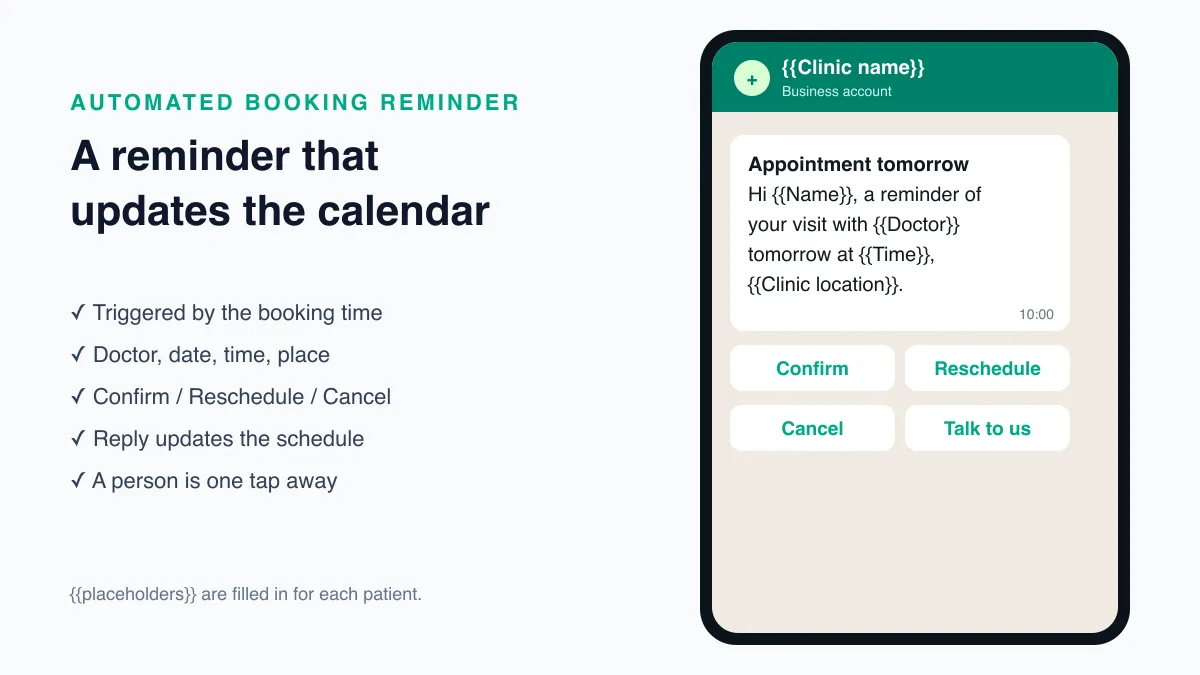
- Reschedule and cancel options in reply to a reminder
- A message when a review visit falls due
Keep with people:
- Questions about symptoms, medicines, or results
- Requests that need a doctor's judgement, such as an urgent slot
- Complaints and billing disputes
- Anything a patient writes that sounds worried or unwell
Design every automated flow with a way out. WhatsApp's Business Messaging Policy asks businesses that automate to offer a clear path to a human (https://business.whatsapp.com/policy), and patients trust automation more when they know a person is one reply away.
How the Pieces Connect
Appointment automation needs three things working together: a place where bookings live, a calendar that knows each doctor's free time, and WhatsApp messages that react to changes in either.
In Reputoo's appointment bookings, those pieces sit together:
- Booking page: patients choose a service, doctor, and time from a link you share on your website, Google Business Profile, or WhatsApp.
- Staff schedules: each doctor has their own working hours and services, so patients only see slots that are really free.
- Calendar sync: bookings can sync both ways with Google Calendar, so a doctor who blocks time in their calendar is not booked over.
- Reminders and rescheduling: confirmations and reminders go out on WhatsApp, and patients can reply to reschedule.
- Deposits: if your clinic takes advance payment for some services, a Razorpay payment can be collected at booking.
Patients who prefer to phone can be booked by Reputoo's AI booking agent for clinics, which answers calls, checks availability, and books the appointment, after which the patient receives WhatsApp reminders in the same way.
Fill Cancelled Slots Automatically
A cancellation is only a loss if the slot stays empty. When a patient cancels in reply to a reminder, the automation can do three things at once: free the slot in the calendar, confirm the cancellation to the patient, and offer the patient a new time.
If your clinic keeps a waiting list for busy doctors, the front desk can offer the freed slot to the next patient on the list by WhatsApp, with a clear time limit to accept. Keep the decision with the front desk for slots that need clinical priority, such as urgent follow-ups.
Rolling Out Automation in Four Weeks
Switching everything on at once makes problems hard to trace. A steady rollout works better:
- Week 1: confirmations only. Check that every booking produces a correct message with the right doctor, time, and address.
- Week 2: add the main reminder, with Confirm and Reschedule buttons, and make sure replies reach the front desk.
- Week 3: add preparation instructions for the visit types that need them, written by the doctors.
- Week 4: add review-visit reminders and cancellation handling.
Before each step, create the message templates and allow time for Meta's review, which can take up to 24 hours (https://developers.facebook.com/docs/whatsapp/business-management-api/message-templates). Our guide to WhatsApp appointment reminders covers template rules, timing, and wording in more detail.
Keep an Eye on the Automation
Automated messages fail quietly. A template can be paused, a patient's number can be wrong, or a doctor's schedule can change without anyone updating the system. Build a short weekly check into the front desk's routine:
- Messages that failed to deliver, and why
- Patients who replied but did not get an answer
- Bookings made for doctors on leave or outside their hours
- Templates whose status changed after Meta's review
Ten minutes a week keeps small problems from turning into missed appointments. Patient details in these messages are personal data under India's Digital Personal Data Protection Act, 2023 (https://www.meity.gov.in/data-protection-framework), so remove patients who ask to stop messages and keep message content limited to what the appointment needs.
An Example Flow, Start to Finish
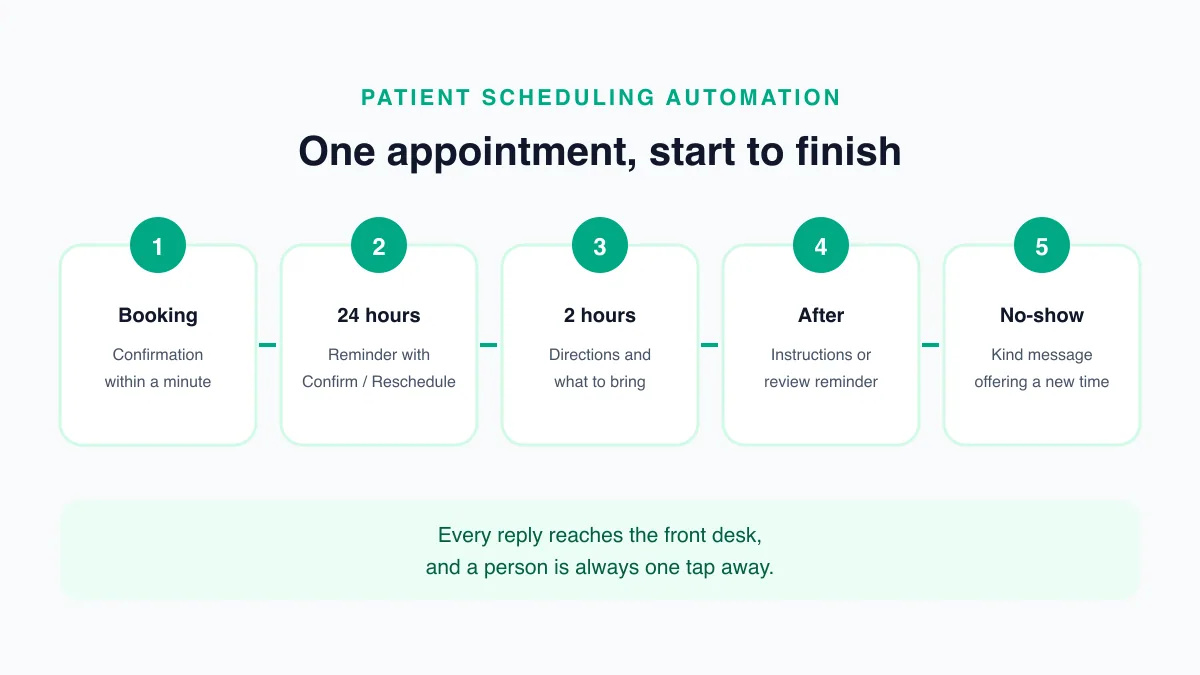
Here is how one appointment moves through a typical automated flow. Every message uses an approved template with placeholders such as {{1}} for the patient's details.
- Booking (any time): the patient books online, by phone, or at the desk. A confirmation goes out within a minute with the doctor, date, time, address, and a map link.
- 24 hours before: a reminder with Confirm and Reschedule buttons.
- Patient taps Reschedule: the patient is offered available times with the same doctor, or asked to reply with a preferred day. The calendar updates when a new time is chosen, and the old slot is released.
- 2 hours before: a short nudge with directions and anything to bring.
- After the visit: instructions or a review-visit reminder, if the doctor has asked for one.
- If the patient does not arrive: a message later that day or the next morning offering a new time, written kindly rather than as a reprimand.
Each step is small, but together they remove most of the calls a front desk makes about a single appointment.
Several Doctors, Several Locations
Automation gets more valuable as a practice grows, and it also needs more care:
- One schedule per doctor: each doctor's hours, leave, and services should live in the system, so patients are never booked into time the doctor does not have.
- Location-aware messages: if you run more than one clinic, the address, map link, and parking note in each message must come from the booking's location, not a single default.
- Replies to the right desk: a reschedule request for the dental branch should reach the dental front desk. Route conversations by department or location so nobody has to forward them by hand.
- Shared rules, local details: keep one set of templates for the whole practice, with placeholders for doctor, location, and instructions, so wording stays consistent while details stay accurate.
When Patients Do Not Reply
Not every patient taps Confirm. Silence is not a cancellation, so do not free the slot automatically without telling the patient. Instead:
- Send one follow-up nudge a few hours after the first reminder for patients who have not responded.
- For long or high-demand appointments, such as procedures or specialist slots, have the front desk call patients who still have not replied.
- Note the outcome against the booking, so the doctor knows whether the patient confirmed.
Over time, the booking history shows which patients reliably confirm and which need a call, and your team can spend its time where it makes a difference.
Tell Patients What to Expect
Automation feels helpful when patients know it is coming. At booking, tell patients that confirmations and reminders will arrive on WhatsApp from the clinic's number, what the buttons do, and how to reach a person. Save the number as a contact in the welcome message instructions, so reminders are recognised rather than ignored as unknown messages. A patient who understands the flow is far more likely to reply to it, and far less likely to call the desk to check whether a message was genuine.
Final Thoughts
WhatsApp medical appointment automation is a practical way to save time, improve scheduling, and reduce no-shows. It helps healthcare providers communicate more consistently while making the patient experience easier.
If your clinic wants a better way to manage appointments without more manual work, automation is a smart place to start.
Automate Medical Appointments with Reputoo
Frequently Asked Questions
What is WhatsApp medical appointment automation?
It is the use of WhatsApp software to automate booking confirmations, reminders, and appointment communication.
Can WhatsApp automate appointment reminders?
Yes. It is one of the strongest use cases for healthcare messaging automation.
Does appointment automation reduce no-shows?
Yes. Timely reminders help patients remember their visits.
Is WhatsApp good for healthcare scheduling?
Yes. It is fast, familiar, and effective for patient communication.
Can Reputoo help with appointment automation?
Yes. Reputoo helps automate and organize appointment-related WhatsApp messages.
Ready to implement this for your business?
Get started with Reputoo — Official WhatsApp Business API, cancel anytime.
Get StartedRelated Articles
WhatsApp Marketing
WhatsApp Customer Support for Healthcare: How to Improve Response Time and Patient Experience
9 min
WhatsApp Marketing
WhatsApp Follow-up Messages for Patients: How to Improve Care, Communication, and Patient Engagement
9 min
WhatsApp Marketing
WhatsApp Telehealth Messaging: How to Improve Virtual Care Communication and Patient Follow-Up
9 min