
WhatsApp Follow-up Messages for Patients: How to Improve Care, Communication, and Patient Engagement
Learn how WhatsApp follow-up messages for patients help healthcare providers improve care, reduce missed steps, and strengthen communication.
Riya
Reputoo
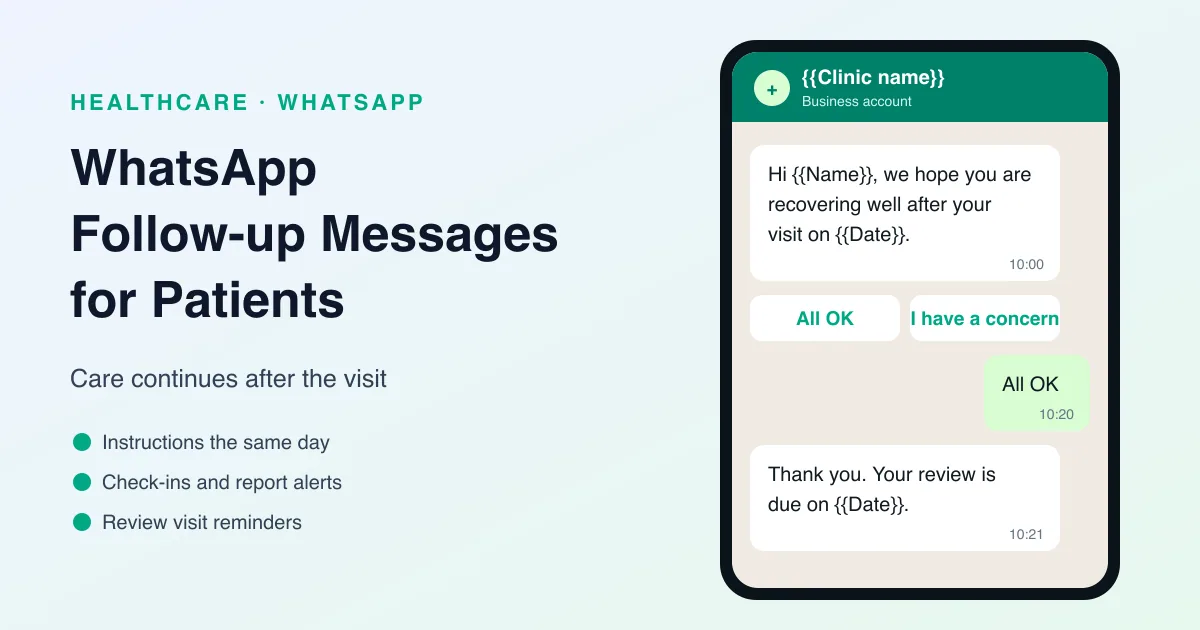
Patient care does not end when the appointment is over. Many people need reminders, instructions, check-ins, or next-step guidance after a visit. If those follow-up messages are delayed or unclear, patients may forget important details or miss the next stage of care. That is why WhatsApp follow-up messages for patients are so useful.
WhatsApp gives healthcare providers a quick and familiar way to stay connected with patients after an appointment, treatment, or consultation. It helps make sure patients know what to do next and gives providers a simple channel for ongoing communication.
For clinics, hospitals, dental practices, and wellness providers, follow-up communication can improve patient satisfaction and help support better care continuity.
What Are WhatsApp Follow-up Messages for Patients?
WhatsApp follow-up messages for patients are messages sent after a healthcare interaction to provide instructions, check in on recovery, or remind patients about next steps.
They can include:
- Post-appointment instructions
- Care reminders
- Recovery check-ins
- Test result notifications
- Return visit reminders
- Additional support messages
The goal is to keep the patient informed and supported after the visit.
Why Follow-up Messages Matter in Healthcare
Follow-up communication helps patients stay on track and feel cared for.
It can:
- Improve care continuity
- Reduce confusion after treatment
- Help patients remember instructions
- Encourage return visits when needed
- Improve the overall patient experience
When patients are well informed after their visit, they are more likely to follow through with care steps.
Why WhatsApp Works for Follow-up Communication
WhatsApp is effective for follow-up messages because it is quick, direct, and easy for patients to use.
Here’s why it works:
- Patients usually check WhatsApp often
- Messages are seen quickly
- Follow-ups feel personal and helpful
- Patients can reply if they have questions
- It is easier than making extra phone calls
That makes WhatsApp a practical tool for post-visit communication.
Best Use Cases for Patient Follow-up Messages
There are several ways healthcare providers can use WhatsApp for follow-up.
1. Post-visit instructions
Send care instructions after the appointment or treatment.
2. Recovery check-ins
Check on the patient after a procedure or consultation.
3. Reminder for next steps
Let patients know what they need to do next.
4. Follow-up appointment reminders
Encourage patients to book or attend return visits.
5. Lab result notifications
Let patients know when results are available or when to take action.
6. Patient support messages
Offer a simple way for patients to ask questions after the visit.
These messages help keep the care journey moving smoothly.
Benefits of WhatsApp Follow-up Messages
Follow-up messaging can improve both patient care and operations.
Better patient understanding
Patients receive important information in a clear format.
Improved care continuity
The next step in the care process is easier to follow.
Fewer missed instructions
Patients are less likely to forget what they should do after the visit.
Better patient engagement
Follow-up messages help patients stay connected to the provider.
Less manual work
Automation can reduce the burden on staff.
What a Good Follow-up Message Should Include
A strong follow-up message should be short, useful, and respectful.
It should include:
- Patient name
- Reason for the message
- Clear next step
- Support contact if needed
- A professional tone
The message should help, not overwhelm.
Why Reputoo Helps with Follow-up Messages
Reputoo helps healthcare providers automate WhatsApp follow-up communication so they can stay connected with patients more efficiently.
With Reputoo, you can:
- Send follow-up messages after visits
- Automate care reminders
- Improve patient communication
- Keep track of patient workflows
- Reduce repetitive manual follow-up work
That makes it easier to provide a smoother patient experience.
Best Practices for WhatsApp Follow-up Messages
If you want to use WhatsApp follow-up messages well, follow these best practices:
Be timely
Send the message soon enough to be useful.
Keep it clear
Patients should understand the message immediately.
Use a respectful tone
Healthcare communication should always feel professional.
Personalize when possible
Use the patient’s name or reference their visit if appropriate.
Make the next step obvious
Tell patients what they need to do next.
Common Mistakes to Avoid
Follow-up messages can lose effectiveness when they are not handled properly.
Avoid these mistakes:
- Sending vague messages
- Making them too long
- Using a casual tone that feels unprofessional
- Forgetting to include a next step
- Over-messaging patients
The message should support the patient journey, not distract from it.
Plan Follow-ups by Type of Visit
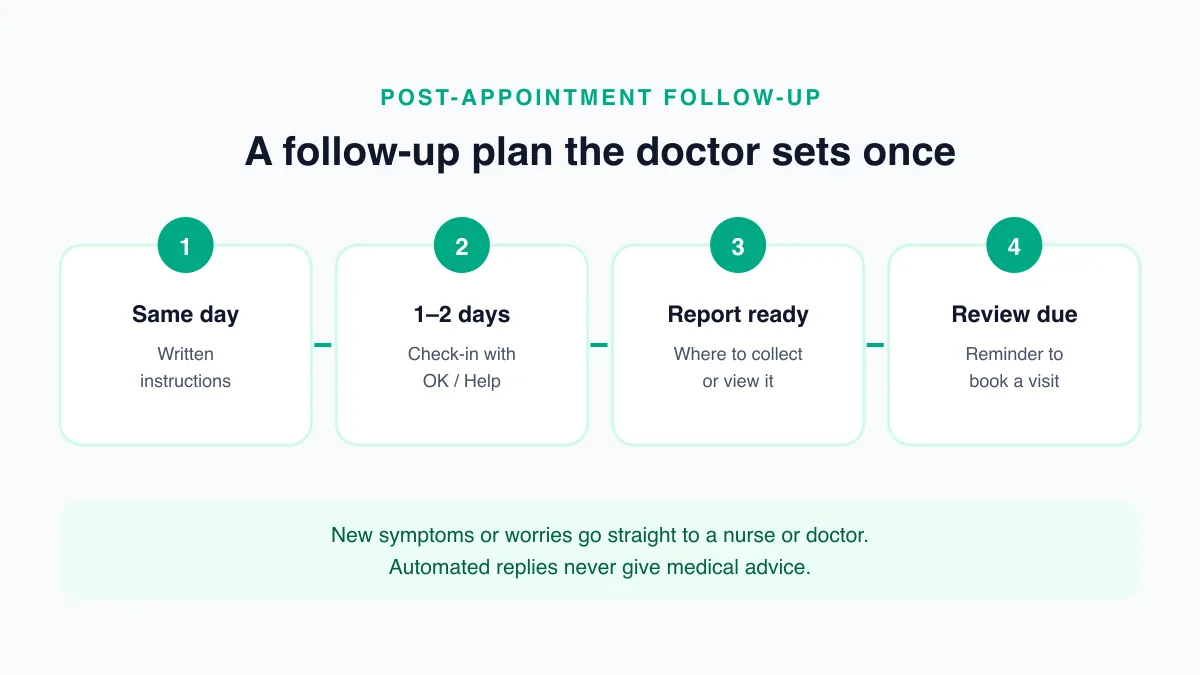
Different visits need different follow-ups. Agree the plan with your doctors so every message reflects their instructions, then automate only the parts that are the same for every patient. A starting point:
- Routine consultation: instructions the same day, and a reminder when the next visit or repeat prescription is due.
- Minor procedure or dental treatment: written aftercare the same day, a check-in a day or two later, and a reminder for any review visit.
- Lab tests: a message when the report is ready, with how to collect or view it and whether the doctor wants to discuss it.
- Ongoing care, such as diabetes or blood pressure: reminders for periodic tests and reviews, at the intervals the doctor sets.
Write the schedule down once, and the same plan runs for every patient without anyone needing to remember it.
Example Follow-up Messages
Placeholders such as {{1}} are filled in for each patient when the message is sent.
Same-day instructions
Hello {{1}}, thank you for visiting {{2}} today. Your doctor's instructions are attached. If anything is unclear, reply to this message and our team will help.
Check-in after a procedure
Hi {{1}}, we hope you are recovering well after your visit on {{2}}. Reply OK if all is well, or HELP if you have a concern and a member of our team will contact you.
Report ready
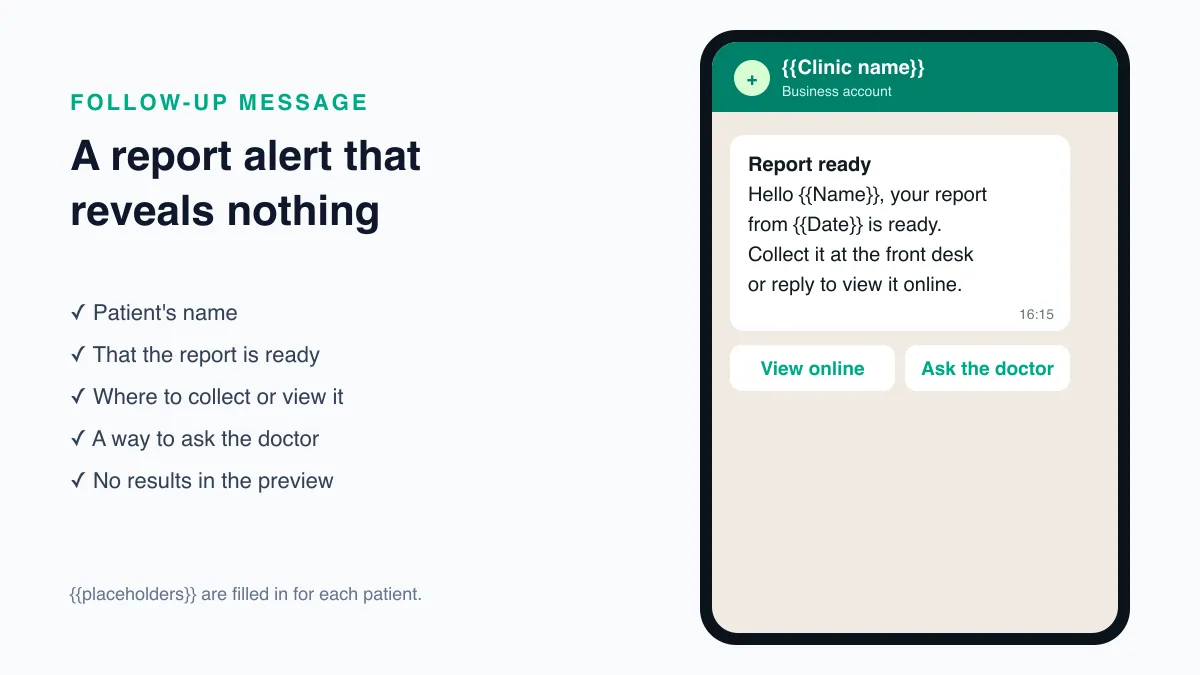
Hello {{1}}, your report from {{2}} is ready. You can collect it at the front desk or reply REPORT and we will tell you how to view it.
Review visit due
Hi {{1}}, Dr {{2}} asked to see you again around {{3}}. Reply BOOK to choose a time.
Follow-ups are usually sent days after the last conversation, so on the WhatsApp Business Platform each one is an approved message template (https://developers.facebook.com/docs/whatsapp/business-management-api/message-templates). Keep them strictly about the patient's care. A follow-up that also promotes a service is treated as marketing, which patients can switch off. Our guide to WhatsApp appointment reminders explains the template rules.
Report Notifications Without Revealing Results
A report notification should say that something is ready, not what it says. Messages can appear on a lock screen or a shared family phone, and a result without the doctor's explanation can cause needless worry. Tell the patient where and how to get the report, and whether the doctor wants to discuss it.
In India, test results are personal data under the Digital Personal Data Protection Act, 2023 (https://www.meity.gov.in/data-protection-framework). Share them only through a channel the patient has agreed to, and only with the patient or someone they have authorised.
If your clinic offers reports online, a secure link that asks the patient to verify their identity is safer than attaching the report to a message. The WhatsApp message then becomes a simple pointer: the report is ready, here is where to see it, and here is how to ask the doctor about it.
When a Patient Replies with a Concern
The most valuable part of a check-in is the reply. Decide in advance what happens to each kind of answer:
- "OK" or similar: close the follow-up, no action needed.
- A question about instructions: the front desk answers from the doctor's written instructions or passes it on.
- A new symptom or worry: send it to a nurse or doctor straight away, and tell the patient when they will hear back.
- An emergency: reply with the clinic's emergency guidance and India's emergency number, 112.
Automated replies should never give medical advice. Use them to acknowledge the message and hand it to a person. A shared inbox such as Reputoo's WhatsApp team inbox lets the right staff member pick up each reply.
Asking for Feedback the Right Way
A follow-up is a natural moment to ask how the visit went. Use the answers to improve your service, such as waiting times, front-desk help, and clarity of instructions.
Be careful about turning feedback into promotion. The National Medical Commission's Guidelines on Ethical Advertising and Public Communication (6 October 2026) say a registered medical practitioner shall not request or share patient testimonials or reviews for professional promotion on social media, and prohibit fake or paid reviews (NMC notice No. R-13014/01/2024-Ethics, https://medicaldialogues.in/pdf_upload/2026/10/07/nmc-guidelines-on-ethical-advertising-and-public-communication-478642.pdf). Keep feedback requests about the patient's experience, and check with your compliance adviser before linking them to public review sites.
Measuring Follow-up
Track a few numbers from your own practice:
- How many patients reply to check-ins, and how many raise a concern
- How many patients book the review visit after a reminder
- How quickly concerns reach a clinician
- How many reports are collected after a "report ready" message
If replies drop, shorten the message or change its timing. For a wider view of WhatsApp across a practice, read our guide to WhatsApp patient communication.
Setting Up Automated Follow-ups, Step by Step
Follow-ups are easy to automate once the plan is written down:
- Write the plan with your doctors: which visits get which follow-up, and when.
- Get access to the WhatsApp Business API, so messages can go out automatically from the clinic's number. Our guide on how to get the WhatsApp Business API explains how.
- Create the templates for instructions, check-ins, report notifications, and review reminders, and submit them for approval.
- Connect visit data: each follow-up needs the patient's name, number, visit date, and type of visit from your appointment or clinic software.
- Set the triggers: for example, a check-in two days after a procedure, or a reminder when a review visit is due.
- Assign replies: decide who reads check-in replies and how concerns reach a clinician.
- Test with staff acting as patients before you switch it on.
Begin with one kind of follow-up, such as review reminders, and add the others once the first runs smoothly.
When Patients Miss Their Review Visit
Some patients will not book or attend the review the doctor asked for. A short, kind message often helps, sent a few days after the review was due: "We noticed you have not yet booked your review with Dr {{name}}. Reply BOOK to choose a time, or CALL if you would like us to phone you."
If the patient still does not respond, let the doctor decide whether a phone call is needed. Repeated automated reminders to a patient who has not replied can feel like pressure. One reminder and a personal call where the doctor thinks it matters are usually enough.
Follow-ups for Long-Term Care
Patients with ongoing conditions, such as diabetes, thyroid disorders, or high blood pressure, need regular tests and reviews over months or years. These are the follow-ups most often forgotten, because nothing prompts the patient between visits.
A few practices help:
- Store the interval the doctor sets with each patient's record, rather than using one schedule for everyone.
- Remind about the test before the review, so results are ready when the patient sees the doctor.
- Send repeat-prescription reminders only as the doctor has instructed, and route medicine questions to a clinician.
- Let patients pause reminders when they move, change doctors, or are being treated elsewhere.
Long-term follow-ups are where a consistent, automated schedule helps most. The doctor decides the plan once, and the reminders keep it going without relying on anyone's memory.
Final Thoughts
WhatsApp follow-up messages for patients are a simple way to improve communication after a visit or treatment. They help patients understand what comes next and make it easier for healthcare teams to stay connected.
If your goal is better patient engagement and smoother care coordination, follow-up messages should be part of your workflow.
Automate Patient Follow-ups with Reputoo
Frequently Asked Questions
What are WhatsApp follow-up messages for patients?
They are messages sent after a visit or treatment to provide instructions, reminders, or support.
Why are follow-up messages important?
They help patients stay informed and improve care continuity.
Can follow-up messages be automated?
Yes. Platforms like Reputoo can help automate patient follow-ups.
Is WhatsApp good for post-appointment communication?
Yes. It is fast, familiar, and easy for patients to use.
Can healthcare teams use WhatsApp for recovery check-ins?
Yes. It is a good channel for simple check-in and support messages.
Ready to implement this for your business?
Get started with Reputoo — Official WhatsApp Business API, cancel anytime.
Get StartedRelated Articles
WhatsApp Marketing
WhatsApp Customer Support for Healthcare: How to Improve Response Time and Patient Experience
9 min
WhatsApp Marketing
WhatsApp Medical Appointment Automation: How to Save Time and Improve Patient Scheduling
9 min
WhatsApp Marketing
WhatsApp Telehealth Messaging: How to Improve Virtual Care Communication and Patient Follow-Up
9 min