
WhatsApp Telehealth Messaging: How to Improve Virtual Care Communication and Patient Follow-Up
Learn how WhatsApp telehealth messaging helps healthcare providers improve virtual care communication, patient follow-up, and support.
Riya
Reputoo
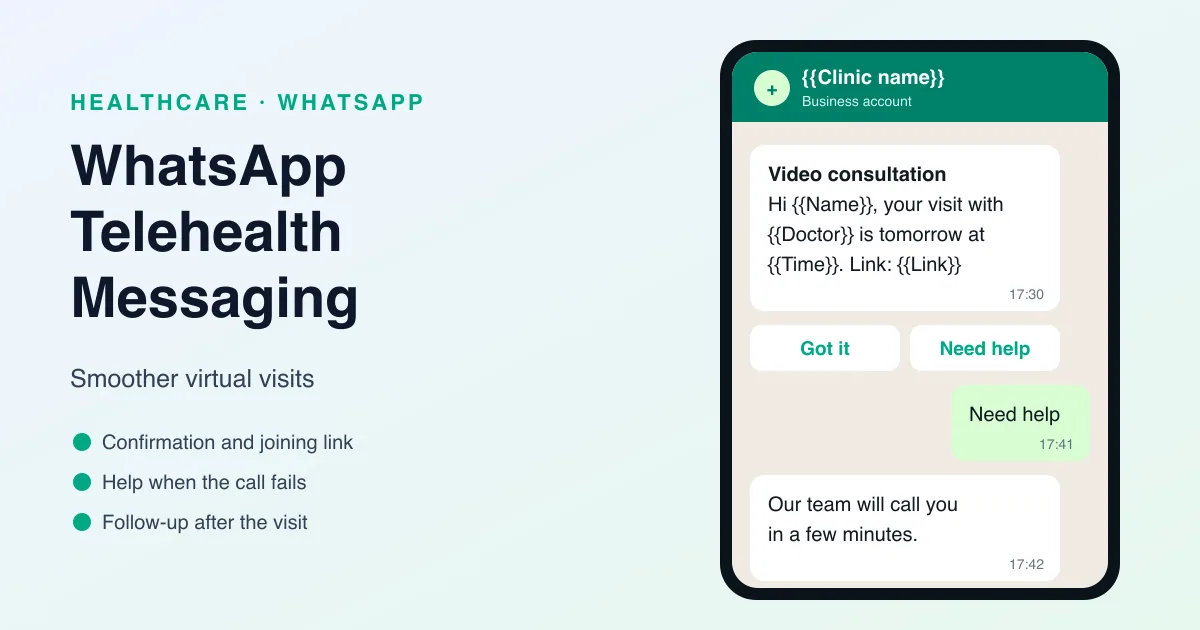
Telehealth has made healthcare more flexible and accessible, but it also creates new communication needs. Patients may need reminders, visit links, post-visit instructions, or follow-up support after a virtual appointment. That is where WhatsApp telehealth messaging can help.
WhatsApp gives healthcare providers a fast and familiar way to communicate with patients during the telehealth process. Since many people already use WhatsApp every day, it is a natural channel for booking support, appointment reminders, virtual visit coordination, and follow-up messages.
For clinics, telehealth platforms, and virtual care providers, WhatsApp can help make the communication experience smoother and more personal.
What Is WhatsApp Telehealth Messaging?
WhatsApp telehealth messaging is the use of WhatsApp to support virtual healthcare communication. This can include appointment coordination, reminder messages, visit instructions, and follow-up communication after a telehealth session.
It can be used for:
- Telehealth appointment reminders
- Virtual visit links
- Patient instructions
- Follow-up care messages
- Rescheduling support
- General patient communication
The goal is to make virtual care easier to manage and more convenient for the patient.
Why WhatsApp Works for Telehealth
Telehealth depends on communication. If patients miss the visit link, forget the timing, or need help after the appointment, the experience can break down. WhatsApp helps because it is fast, direct, and easy to use.
Here’s why it works well:
- Patients usually check WhatsApp frequently
- Messages are seen quickly
- Visit details are easy to share
- Follow-up support feels personal
- Automation can reduce manual effort
That makes it a practical tool for supporting telehealth from start to finish.
Best Use Cases for WhatsApp Telehealth Messaging
There are several moments where WhatsApp can improve the telehealth experience.
1. Appointment reminders
Remind patients about upcoming virtual visits.
2. Visit links and instructions
Send the telehealth link and any instructions before the session.
3. Rescheduling support
Help patients change their visit if needed.
4. Post-visit follow-up
Share care instructions or next steps after the appointment.
5. Ongoing patient support
Keep patients informed and supported between virtual visits.
6. Technical help
Make it easier for patients to ask questions if they have trouble connecting.
These messages help reduce friction and improve the experience.
Benefits of WhatsApp Telehealth Messaging
Telehealth messaging offers a number of advantages.
Better attendance
Reminders help patients show up on time.
Smoother visits
Patients get the information they need before the session.
Better follow-up
Post-visit communication helps support care continuity.
Less manual work
Automation reduces the burden on staff.
Better patient experience
Patients feel more supported and informed.
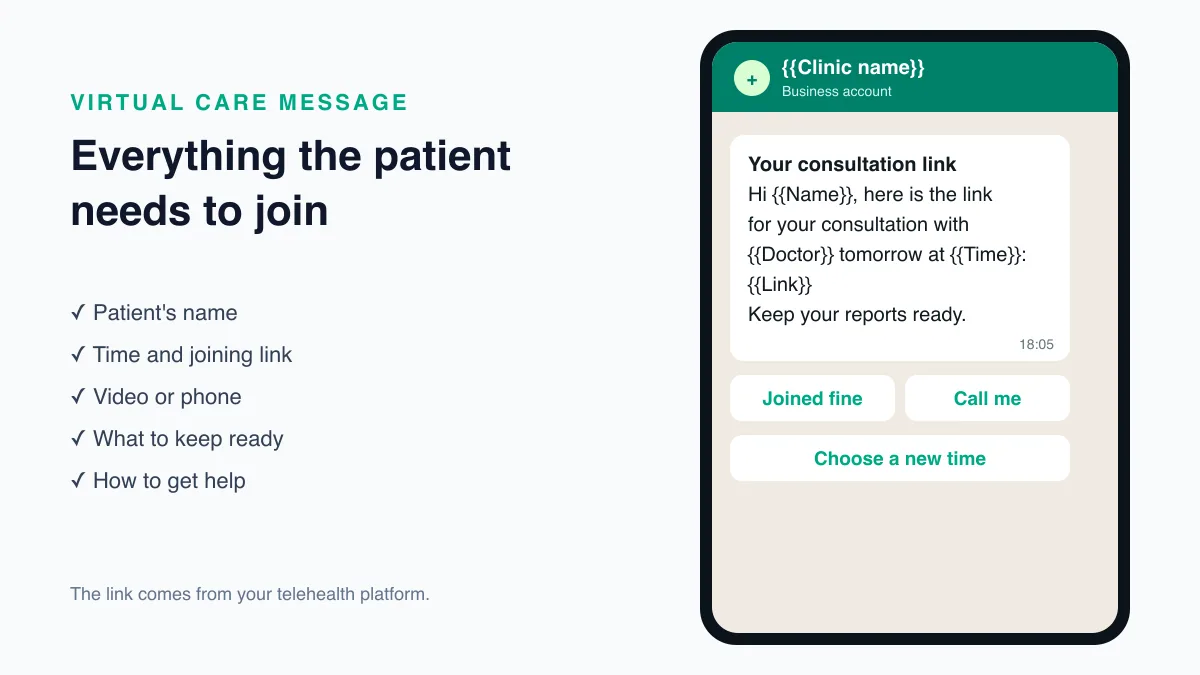
What a Good Telehealth WhatsApp Message Should Include
A telehealth message should be short, clear, and helpful.
It should include:
- Patient name
- Appointment time or visit link
- Simple instructions
- Next step if needed
- Contact option for help
The message should remove confusion and make the telehealth experience easier.
Why Reputoo Helps with Telehealth Messaging
Reputoo helps healthcare providers automate and organize WhatsApp communication for telehealth workflows.
With Reputoo, you can:
- Send telehealth reminders
- Share virtual visit updates
- Automate follow-up messages
- Improve patient communication
- Reduce manual coordination work
That makes it easier to support virtual care without adding more pressure on staff.
Best Practices for WhatsApp Telehealth Messaging
If you want better results, follow these best practices:
Keep it clear
Patients should know exactly what the message is for.
Be timely
Send reminders and visit details early enough for the patient to prepare.
Stay professional
Healthcare messages should feel trustworthy and respectful.
Make support easy
Patients should know how to get help if they need it.
Use automation where possible
Automate repeat messages so your team can focus on care.
Common Mistakes to Avoid
Telehealth communication can fail if it is unclear or inconsistent.
Avoid these mistakes:
- Sending the visit link too late
- Making the message too long
- Using an unprofessional tone
- Forgetting follow-up communication
- Leaving patients without support options
Good telehealth messaging should reduce friction, not add to it.
What India's Telemedicine Practice Guidelines Say
In India, teleconsultations follow the Telemedicine Practice Guidelines issued on 25 March 2020 as part of the professional conduct regulations for doctors (https://esanjeevani.mohfw.gov.in/assets/guidelines/Telemedicine_Practice_Guidelines.pdf). Several points shape how a practice uses WhatsApp:
- WhatsApp is an accepted tool. The guidelines list chat platforms such as WhatsApp, alongside phone and video, among the tools a registered medical practitioner may use.
- Nobody is anonymous. The doctor and the patient must know each other's identity. The doctor should confirm the patient's name, age, and contact details and tell the patient their own name and qualifications.
- Show the registration number. Every practitioner must display their State Medical Council or national registration number on electronic communication, including WhatsApp.
- Consent. If the patient starts the teleconsultation, consent is implied. In other situations, explicit consent is needed, and it can be given by message or recorded during the call.
- Keep records. The doctor must keep a log of the interaction, such as chat records, and any prescription shared with the patient.
The guidelines govern the consultation itself. Most WhatsApp messages around a virtual visit are coordination rather than consultation: reminders, links, and instructions. Keep the two clearly apart, so clinical advice always comes from the doctor and is recorded properly.
Before the Visit: Getting Patients Ready
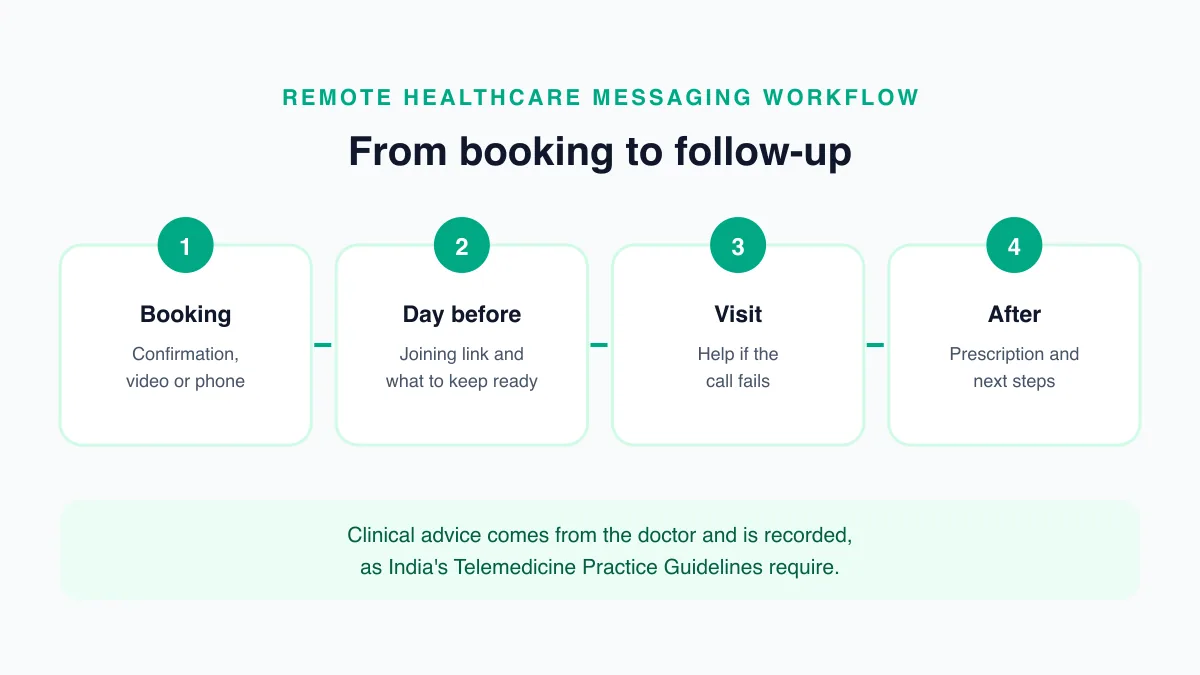
Most failed virtual visits fail before they start, because the patient cannot find the link, has the wrong app, or joins from a noisy place. A short sequence of messages prevents most of this:
- At booking: confirm the date and time, say whether the visit is by video or phone, and name the app or link the patient will use.
- The day before: send the joining link from your telehealth platform, with a one-line instruction for opening it on a phone.
- Shortly before the visit: a reminder to find a quiet, well-lit place, keep reports and the current medicine list nearby, and charge the phone.
Ask patients to reply if anything does not work, so your team can help before the doctor is waiting.
Example Messages
Placeholders such as {{1}} are filled in for each patient when the template is sent.
Visit confirmation
Hello {{1}}, your video consultation with {{2}} is booked for {{3}} at {{4}}. You will receive the joining link a day before. Reply HELP if you need assistance.
Joining link
Hi {{1}}, here is the link for your consultation with {{2}} tomorrow at {{3}}: {{4}}. Please keep your recent reports and medicine list ready.
Connection problem
Hi {{1}}, it looks like you could not join your consultation. Reply CALL and our team will phone you, or reply NEW to choose another time.
Because these messages are sent outside a 24-hour conversation window, each one is an approved message template on the WhatsApp Business Platform (https://developers.facebook.com/docs/whatsapp/pricing). Our guide to WhatsApp appointment reminders explains the template rules in more detail.
When the Video Call Fails
Have a fallback ready before the first patient joins. Decide who watches for patients who have not joined, how long the doctor waits, and whether the visit moves to a voice call or a new time. Tell the patient the plan in the joining-link message so they are not left waiting.
A WhatsApp reply such as "CALL" or "NEW" gives patients a one-word way to tell you what happened, and the shared inbox shows the front desk which patients need help right now. Reputoo's WhatsApp team inbox is built for that kind of handover.
After the Visit
Use WhatsApp for the logistics that follow a consultation:
- Where to collect or view the prescription, if the doctor has issued one
- Which tests to book and where
- When the follow-up visit is due, with a way to book it
- Who to contact with questions
Leave clinical instructions to the doctor, and keep automated messages to scheduling and directions. For timing and wording ideas, see our guide to WhatsApp follow-up messages for patients.
Prescriptions deserve particular care. Under the guidelines, a prescription comes from the registered medical practitioner who conducted the consultation, and the doctor keeps a record of it as they would for an in-person visit. If your clinic shares prescriptions over WhatsApp, have the doctor or a designated staff member send them from the clinic's number, never from an automated flow, and confirm that the message reached the right patient. A prescription sent to the wrong number is both a privacy problem and a safety one, so double-check the number on file before anything clinical is shared.
Privacy for Remote Patients
Patients often join virtual visits from home or work, on a phone that others may see. Keep message previews free of diagnoses and results, and send sensitive details only in the consultation or a private conversation. In India, appointment and visit details are personal data under the Digital Personal Data Protection Act, 2023 (https://www.meity.gov.in/data-protection-framework). Collect only what the visit needs, and let patients opt out of messages when they ask.
Choosing Between Chat, Voice, and Video
The Telemedicine Practice Guidelines recognise three modes of consultation: video, audio, and text, which includes chat and messaging. They also note that some situations call for a real-time conversation or for the doctor to see the patient, and they leave the choice of mode to the doctor's judgement.
That gives a practical split for most practices:
- Text on WhatsApp: booking, reminders, links, instructions, and simple follow-up questions the doctor is comfortable answering in writing.
- Voice: follow-up visits where the doctor needs to hear the patient but not see them.
- Video: new problems, visual examinations, and any case where the doctor wants to see the patient.
Write the split down for your clinic, so the front desk books the right kind of visit and patients know what to expect.
Setting Up the Workflow
A telehealth messaging workflow can be ready in a few steps:
- Choose the consultation platform your doctors will use for video or voice, and confirm how it creates joining links.
- Get access to the WhatsApp Business API, so messages can be sent automatically from the clinic's number. Our guide on how to get the WhatsApp Business API explains the process.
- Write the templates for confirmation, joining link, and missed-visit follow-up, and submit them for approval.
- Connect bookings to messages, so a new teleconsultation booking triggers the confirmation and schedules the link and reminder.
- Decide who handles replies during clinic hours and what the out-of-hours message says.
- Test the full journey with a staff member acting as the patient, including a deliberately failed connection.
Start with one doctor or one department, fix what the test visits reveal, and then extend the workflow to the rest of the practice.
Helping Patients Who Are New to Video Calls
Telehealth only works if the patient can join. Older patients, patients in areas with weak mobile data, and anyone who has never joined a video call need a little more help:
- Offer a practice call: a member of staff can call the patient a day before to check the link opens and the camera and microphone work.
- Invite a family member: many patients are more comfortable when a younger relative helps them join. Ask whether someone will be with them, and include that person in the instructions if the patient agrees.
- Write instructions in the patient's language: one or two short lines are better than a long guide.
- Plan for weak connections: tell the patient that the doctor may switch to a voice call if the video keeps dropping, so they are not surprised.
These small steps cost a few minutes of staff time and save the doctor from waiting for a patient who cannot get in.
Final Thoughts
WhatsApp telehealth messaging is a simple and effective way to improve virtual care communication. It helps healthcare providers stay connected with patients, reduce confusion, and make telehealth more convenient.
If your organization wants a smoother telehealth experience, WhatsApp can be a valuable part of the workflow.
Improve Telehealth Communication with Reputoo
Frequently Asked Questions
What is WhatsApp telehealth messaging?
It is the use of WhatsApp to support virtual healthcare communication, reminders, and follow-ups.
Can WhatsApp be used for telehealth appointment reminders?
Yes. It is a strong channel for reminders and visit coordination.
Is WhatsApp useful for virtual care?
Yes. It helps patients stay informed and makes communication easier.
Can telehealth messaging be automated?
Yes. Platforms like Reputoo can help automate reminders and follow-ups.
Is WhatsApp good for patient follow-up after telehealth visits?
Yes. It is useful for post-visit instructions and ongoing support.
Ready to implement this for your business?
Get started with Reputoo — Official WhatsApp Business API, cancel anytime.
Get StartedRelated Articles
WhatsApp Marketing
WhatsApp Customer Support for Healthcare: How to Improve Response Time and Patient Experience
9 min
WhatsApp Marketing
WhatsApp Medical Appointment Automation: How to Save Time and Improve Patient Scheduling
9 min
WhatsApp Marketing
WhatsApp Follow-up Messages for Patients: How to Improve Care, Communication, and Patient Engagement
9 min